
Reward Your Customers with Free Products, Not Just Coupons
Not every reward needs to be a discount. Now you can offer any product from your store as a loyalty or referral reward - customers claim it, add to cart, and it's free.
Continue Reading →
Not every reward needs to be a discount. Now you can offer any product from your store as a loyalty or referral reward - customers claim it, add to cart, and it's free.
Continue Reading →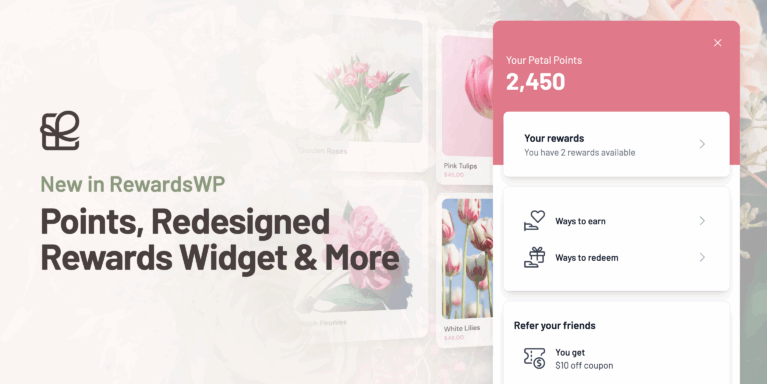
AffiliateWP helps you win new customers through affiliates.
RewardsWP helps you keep them.
We launched RewardsWP earlier this year with referrals as the first step. AffiliateWP scales acquisition through affiliates. RewardsWP scales loyalty through customers.
Referrals are powerful, but not every customer will share a link. Points turn every purchase into a reason to come back.
That is why I am excited to announce a major RewardsWP update with Points, a redesigned Rewards Widget, and new features that make loyalty easier to launch, run, and measure.

Points give customers a clear reason to come back. They earn as they shop, then turn those points into rewards on their next order.

Customers earn points automatically on purchases and any other actions you enable. When they are ready, they open the widget, pick a reward, and redeem it.

After redeeming, RewardsWP shows the reward instantly, including a copyable coupon and an Apply to cart button. It is simple for customers, and it drives the next purchase.
With Points now built in, we redesigned the Rewards Widget from the ground up. It is mobile friendly, easier to navigate, and designed to grow as we add more loyalty features over time.
The widget is built to drive the next step, whether that is shopping, redeeming a reward, or sharing a referral link.


Points are simple for customers, and they are simple for you to run.
RewardsWP ships with sensible defaults for earning and redeeming so you can launch fast. Then you can fine tune everything as you learn what your customers respond to.
Choose the actions that earn points, like purchases, accounts, reviews, and bonuses. You can turn any action on or off at any time.

Create rewards customers can work toward, like fixed amount discounts, percentage discounts, and free shipping.

Adjust your points per dollar, pause an action, or change a reward in seconds. No code required.

Petal Points is just an example. You can name your points to match your brand.

Set a global expiration period so points stay engaging and do not accumulate forever. Points expire after a set time from when they are earned.

Once points and referrals are live, you want to know what they are driving.
RewardsWP includes a new Dashboard so you can see what is happening at a glance.
Track the metrics that matter most, from rewards-applied revenue and member growth to points activity and completed referrals.

Spot what is trending up, what needs attention, and where to focus next. Switch between points and referrals to see performance over time, plus an easy to read total for the period.

Once your program is live, there will be moments where you need to step in. A customer needs a points adjustment. A referral link needs to be refreshed. You want to exclude someone from the program.
RewardsWP now includes new member management tools so you can handle those moments quickly, without digging through multiple screens.

From the Members screen you can quickly adjust points, change a referral link, or delete a member.

Open any member to see their points balance, referral performance, and activity history in one place. This makes it easy to understand what has happened over time and respond to support requests quickly.
From this screen you can also:


Switching from another loyalty program does not have to mean starting over.
RewardsWP includes a Points Import tool that lets you bring in existing member point balances from a CSV. Upload your file, map columns, and import so customers keep the points they have already earned.


Once your program is live, you need two things. A clear view of performance, and an easy way to share the data.
This update adds a Reports screen with trends for key metrics, plus exports you can generate on demand.

Use exports to share results with your team or pull raw data for analysis. Generate exports for Members, Points activity, Referrals, or Rewards.
Exports are saved for up to 7 days, so you can download them again without rerunning the job. You can also choose to have a download link emailed to you when it is ready.


AffiliateWP helps you win new customers through affiliates. RewardsWP helps you keep them coming back with points, referrals, and a loyalty experience that feels native on your storefront.
If you want to add loyalty to your store, you can get RewardsWP on its own or as part of the AffiliateWP + RewardsWP bundle. Choose the option that fits your store on the pricing page.

Disclosure: Our content is reader-supported. This means if you click on some of our links, then we may earn a commission. We only recommend products that we believe will add value to our readers.
Launch your affiliate program today and unlock a new revenue channel to grow your business faster.
I am a realtor. I am not sure how legal this process might be for me, however it does interest me. Do you have any realtors using your product? I have nothing else to sell, so is there a product line that I could use for points cash in? I assume that I ultimately pay for the product they chose to obtain with points. That is OK, I can always create an account to cover the points.
Hey Charlie – RewardsWP is a refer-a-friend plugin that includes a points system, and it works when referrals are tied to actions like purchases through WooCommerce or Easy Digital Downloads. Since every business operates a little differently (especially in real estate), the best setup really depends on how your current workflow looks. To help us give you accurate guidance, could you share a bit more about how your business operates today at [email protected]? Our team will be happy to review your setup and suggest the best approach for your situation.
Any support for paid memberships pro yet? Or FluentCart?
Hey Kyle – At the moment, RewardsWP supports integrations with WooCommerce and Easy Digital Downloads. We don’t currently have built-in integrations for Paid Memberships Pro or FluentCart.
I agree that support for these platforms would be very helpful, and I’ve gone ahead and added this request to our feature request tracker.
Does Rewards WP work along side AffiliateWP and can it work when not using the traditional “WooCommerce” cart? For example, when only using FunnelKit funnels instead of the traditional cart?
Hey Chris! RewardsWP works great alongside AffiliateWP. At this stage RewardsWP will only function with WooCommerce’s cart.