





Friend reward are the incentive you give to the person who was referred to your store. When an advocate shares their referral link and someone clicks it, that person is the “friend.” A compelling friend reward gives them a real reason to complete their first purchase, turning referral clicks into conversions.
This guide walks you through each friend reward type, how to configure them, and how friends receive their reward. By the end, you’ll have a fully configured friend reward driving new customer purchases.
How friend reward work
When someone clicks an advocate’s referral link, they become the “friend” in the referral relationship. A friend reward gives that person a reason to follow through and place an order, turning a casual click into a real conversion.
Friend reward are configured separately from advocate rewards. You can mix and match reward types across both sides. For example, you might give advocates points for each referral while giving their friends a percentage discount on their first order.
The key difference: advocate rewards go to your existing customer who shared the link. Friend reward go to the new visitor who arrived through that link.
Add a friend reward
To set up a friend reward:
1. Navigate to RewardsWP » Settings » Referrals.
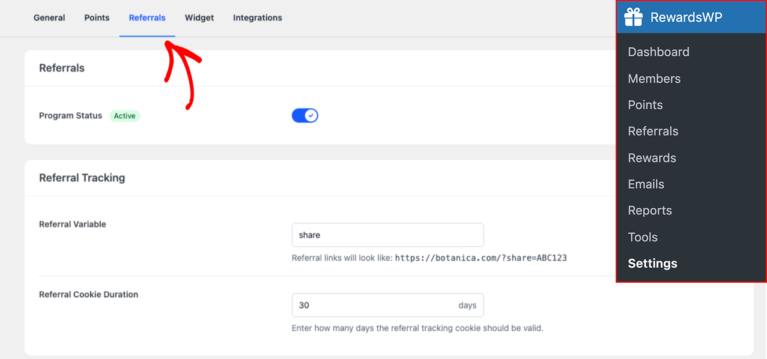
2. Scroll down to the Referal Rewards section.

3. Find the Friend Reward card and click Add Reward.

4. Select a Reward Type from the list.

5. Configure the remaining settings (covered in detail below).
6. Click Save Changes.

Reward types
RewardsWP offers four reward types for friends. The friend reward is the “hook” that convinces a referred visitor to follow through and buy, so choosing the right type matters for your conversion rate.
Amount discount
A fixed discount gives the friend a specific dollar amount off their order (for example, $10 off). This is the most straightforward option and tends to convert well because the value is immediately clear. When a friend sees “$10 off your first order,” there’s no ambiguity about what they’re getting. It’s especially effective for stores with a consistent average order value, since you can size the discount to feel meaningful without guessing what the friend will buy.

Percentage off
A percentage off gives the friend a percentage discount their order (for example, 10% off). The actual dollar savings scale with the order size, which makes this reward type feel more generous on larger orders. A friend spending $150 saves $22.50 with a 15% discount, which is a strong incentive. This is a good fit for stores where order values vary widely, since the reward naturally adjusts to the purchase.

Free shipping
Free shipping removes shipping charges from the friend’s order. Shipping costs are consistently one of the top reasons for cart abandonment, and for referred visitors who are still deciding whether to trust a new store, any additional cost can tip them toward leaving. Removing that friction directly addresses the hesitation and can significantly improve conversion on referred traffic.

Free product
A free product reward lets the friend receive a specific product for free. This is the most tangible reward you can offer. Rather than saving money on something they were already buying, the friend gets something extra. This works particularly well for stores that want to introduce new customers to a product line, offer branded merchandise as a welcome gift, or provide sample-sized items that lead to full-size repurchases. The perceived value of receiving a physical item often exceeds the perceived value of an equivalent dollar discount.

Reward settings
Every friend reward type shares a common set of configurable settings. These control the reward’s value, conditions, and how long it remains valid.
Reward type
Select one of the four friend reward types from the dropdown: Amount discount, Percentage off, Free shipping, or Free product. This is the foundational choice that determines what the friend receives and how the coupon behaves at checkout.
Discount amount or percentage
The value of the reward. What this field represents depends on the reward type:
| Reward type | Amount means |
| Fixed discount | Dollar amount off (e.g., 10 = $10 off) |
| Percentage discount | Percentage off (e.g., 15 = 15% off) |
| Free shipping | Not applicable |
| Free product | Not applicable |
When sizing this value, keep in mind that the friend is a first-time visitor who doesn’t yet trust your brand. The reward needs to be compelling enough to overcome the natural hesitation of buying from a new store. A reward that feels too small relative to your product prices may not convert, while one that’s too generous can erode margins.
Minimum spend
The minimum cart total required for the friend to use their reward. The default is 0 (no minimum), which maximizes conversion by removing any barrier. Setting a minimum protects your margins and nudges friends toward a meaningful first order, but it also adds friction. For a first-time visitor, being told “you need to spend $50 to use this reward” can feel like a bait-and-switch. Balance margin protection against conversion rate when choosing this value.

Reward expiry
This determines how long the friend has to claim and use their reward:
- Never expires – The reward doesn’t expire
- 30 days – Expires 30 days after it’s issued
- 3 months (default) – Expires 3 months after it’s issued
- 6 months – Expires 6 months after it’s issued
- 1 year – Expires 1 year after it’s issued
- 2 years – Expires 2 years after it’s issued
A shorter window creates urgency (“use it before it’s gone”), which can accelerate conversion. A longer window gives the friend time to decide, which is better for high-consideration purchases where the friend may need to research before buying.

Free product selection
For the Free product reward type only, this field lets you select which products the friend can receive. Use the product selector to search for and add eligible products. Consider choosing products that showcase your brand’s quality, are cost-effective for you to give away, and naturally lead to repeat purchases.

Redemption limit
Most friend reward types have a fixed redemption limit of 1, meaning each friend can use their coupon a single time. The exception is Free product friend reward, which have unlimited redemption. The redemption limit can’t be changed for friend reward, and this is intentional: the friend reward is designed to incentivize a single first purchase, not ongoing discounts.
How friends receive their reward
When a friend clicks a referral link and arrives at your store, here’s what happens:
1. The friend arrives at your store – RewardsWP records the referral link click and associates it with the advocate.
2. The friend sees a claim form – The rewards widget displays a claim form where the friend can enter their email address to claim the reward.
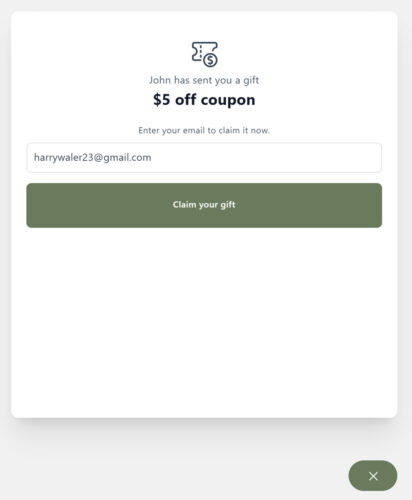
3. A coupon is generated – When the friend submits the claim form, RewardsWP immediately generates a WooCommerce coupon. The coupon code uses a “friend-” prefix so it’s easily identifiable.
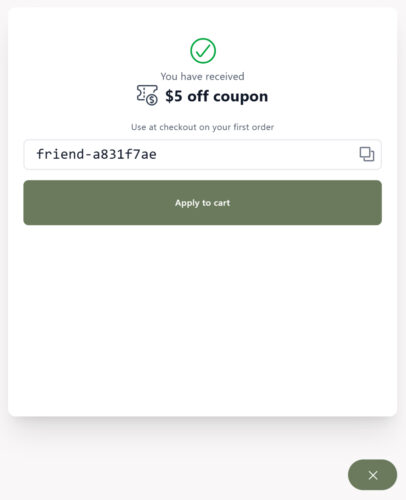
4. The friend receives an email – The coupon code is also sent to the friend’s email address right away.
5. The friend uses the coupon – The friend applies the coupon code at checkout on their purchase.

The friend doesn’t need to have a WordPress account for any of this to work. RewardsWP tracks friends by email address, so guest checkout is fully supported.
Frequently asked questions
Yes, and you should. The advocate reward motivates your existing customer to share, while the friend reward motivates the new visitor to buy. They’re configured independently, so you can choose different reward types and amounts for each side.
If all selected products for a free product friend reward go out of stock, RewardsWP will automatically disable the referral program to prevent friends from earning a reward that can’t be fulfilled. The program re-enables when stock is replenished or you change the reward type.
That’s it! A well-configured friend reward gives referred visitors a compelling reason to make their first purchase.