Are you curious which traffic sources in Google Analytics drive the most sales or conversions on your website?
Understanding traffic sources is crucial, especially if your site tracks eCommerce activities or general conversions. Knowing where your traffic comes from helps pinpoint which channels are most effective in driving sales and conversions through your affiliate program.
In this guide, we’ll teach you how to identify your most effective Google Analytics traffic sources. We’ll cover methods both within Google Analytics and using MonsterInsights, a powerful tool for insights.
Why Monitor Google Analytics Traffic Sources

Understanding why it’s important to monitor your Google Analytics traffic sources is essential, especially for those involved in affiliate marketing and program management.
Essentially, this monitoring gives you a clear picture of where your website visitors are coming from. Are they finding you through social media, organic search, direct links, or through your various affiliate partners? Knowing this helps you make informed decisions.
This information is particularly valuable for affiliate marketers and businesses with affiliate programs.
It lets you see which platforms or partners drive the most traffic to your site. This isn’t just about counting visitors; it’s about understanding which sources lead to actual sales or desired actions on your site so that you can strategize your marketing efforts.
If a particular affiliate or platform brings in a lot of traffic that doesn’t convert, you might redirect your efforts and resources to more profitable channels.
Moreover, monitoring these sources helps in optimizing your marketing strategies. You can tweak your campaigns based on what’s working best, ensuring your marketing budget is used effectively.
It’s not just about finding the most popular source but the most effective one regarding conversions and ROI.
Now, let’s jump into our traffic sources tracking tutorial.
Steps to Identify High-Converting Traffic Sources in Google Analytics
If you want to find your high-converting traffic sources in Google Analytics (GA4), just follow these simple steps:
Step 1: Navigate to the Traffic Acquisition Report
The first thing you need to do is find the Traffic Acquisition Report in Google Analytics.
This report gives you a great overview of where your website visitors are coming from. To find it, go to the Acquisition section in Google Analytics.

Once there, click the Traffic acquisition option. This report is easy to find and understand, making it a good starting point for analyzing your site’s traffic sources.
Step 2: View Your Conversion Rate by Google Analytics Traffic Source
Once you’re in the Traffic Acquisition Report, you’ll see a table that lays out your traffic by channel.
This is where you can see how different sources contribute to your site’s visits. If your screen is small, you might need to scroll to the right of the table to see all the details, like conversions and revenue.
Pay special attention to the dropdowns in the Event count and Conversions columns. Here, you can see detailed numbers for specific events or conversions.

Keep scrolling to the right, and you’ll also find the Revenue column, which is especially important for understanding which traffic sources are most profitable.
Step 3: View Conversions by Landing Page
You can add data about your landing pages to make the Acquisitions report even more useful. Start by clicking on the blue plus sign in the report.

This lets you customize what you’re looking at. From the dropdown menu that appears, select Page/Screen and then Landing page + query string.

Doing this lets you see your revenue and conversions broken down by traffic source and which specific landing pages perform best.
View Your Conversion Rate by Traffic Source in WordPress
Now, if you want to check the same report and find the top converting sources directly from WordPress, follow the steps below.
Step 1: Install MonsterInsights

Begin by installing MonsterInsights, a top-rated Google Analytics plugin for WordPress.
MonsterInsights simplifies connecting your Google Analytics account to your WordPress site, eliminating the need for a developer or complex tools like Google Tag Manager.
This plugin provides a comprehensive view of your store’s performance. It’s not just about tracking basic metrics; it offers actionable insights crucial for businesses focusing on affiliate marketing and program management.
MonsterInsights includes conversion tracking, product performance analysis, social media and referral tracking, advanced form tracking, real-time reports, SEO optimization through keyword tracking, video play tracking, and more.
To use MonsterInsights, you first need to purchase a MonsterInsights Pro license. After buying it, install the plugin and connect it to your Google Analytics account. The setup is straightforward, thanks to an intuitive setup wizard.
Step 2: View Your High-Converting Traffic Sources
Once MonsterInsights is installed and set up, it allows you to view advanced website data directly in your WordPress dashboard, making it unnecessary to navigate away from your site.
To view the conversion rate and revenue by traffic source, go to Insights » Reports in your WordPress dashboard and click on the Traffic » Source/Medium report.
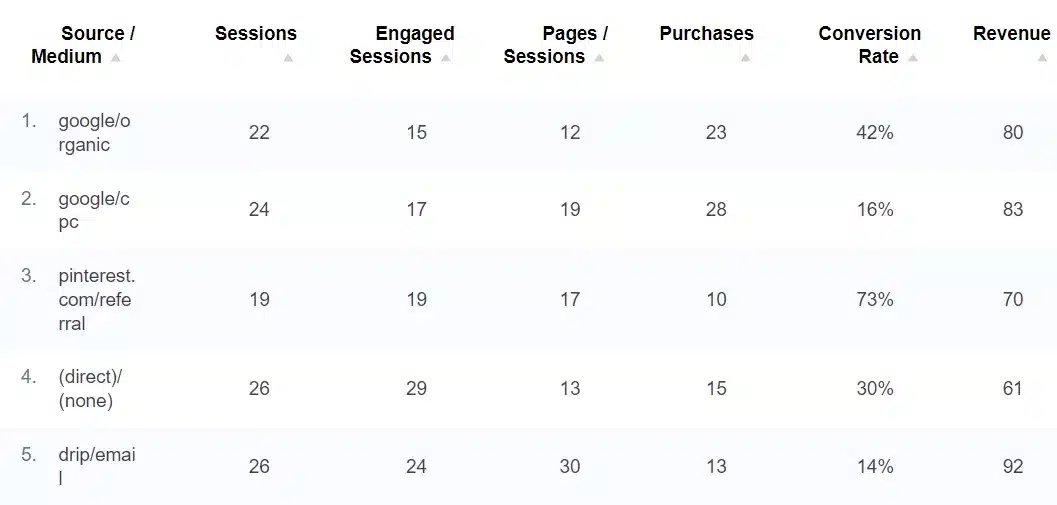
This report shows you the purchases, conversion rate, and revenue broken down by each source/medium.
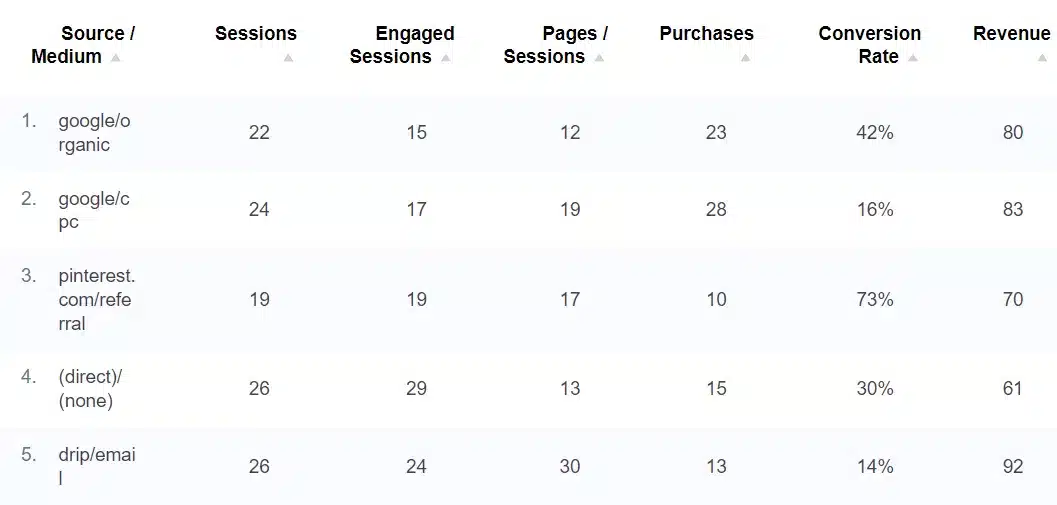
The MonsterInsights Source/Medium Report provides a detailed view of how different Google Analytics traffic sources contribute to your site’s success.
Consider exploring this article for a more in-depth understanding of all the data available in MonsterInsights.
Start Tracking Your High Converting Sources Today
MonsterInsights can significantly enhance your understanding of traffic sources and their impact on your website, especially in eCommerce and affiliate marketing.
To further elevate your eCommerce and affiliate marketing efforts, consider integrating AffiliateWP into your WordPress site. AffiliateWP is a game-changer for affiliate program management and growth.
It equips you with the tools to effectively manage and expand your affiliate network, ensuring you stay ahead in the competitive digital marketing landscape.
But why stop here? Dive deeper into enhancing your strategies with these insightful resources:
- 6 Best WordPress Affiliate Program Plugins for 2024
- Everything You Need to Know About Partnership Marketing (Guide)
- How to Create an Affiliate Registration Form in Elementor (Tutorial)
- 5 Best Affiliate Link Tracking Plugins for WordPress
Don’t wait any longer. Get AffiliateWP today and unlock the full potential of your affiliate campaigns.