





Are you looking to create a custom affiliate registration form for your website?
If your business runs on WordPress, then it couldn’t be easier to create a high-performing, custom affiliate registration form.
In this post we’ll teach you exactly how you can create an affiliate registration form in WordPress.
Why is Your Affiliate Registration Form Important?
Your registration form is one of your first contact points with a new affiliate. Along with your affiliate signup page, it sets the tone for the rest of the relationship, so it’s important to get it right.
When you join a big affiliate network, you don’t get much control over these things. So, this is where owning your affiliate program starts to pay off.
We’re going to show you how to create a custom affiliate registration form, and it’s going to help you achieve some important goals:
- Create a good first impression of your affiliate program (professional and with lots of earning potential).
- Sign up for more skilled, engaged affiliates.
- Cut down on affiliate fraud.
- Inform your affiliate onboarding processes.
One of the most important roles of the affiliate registration form is serving as a filter. Often, affiliate marketing isn’t about the number of affiliates. It’s about quality, and your affiliate registration plays an important part in this battle.
It will help you spot the best affiliates and screen out fraudulent affiliates who aren’t committed to your program.
These sound like some good reasons to create an affiliate registration form, so how can you go about it?
How to Create an Affiliate Registration Form
Setting up an affiliate marketing program and creating an affiliate form is surprisingly simple.
If your website runs on WordPress (which over 40% of the web does), then you can start tracking referrals in just a few minutes.
With the right software, you’ll also get a ton of customizability. This is particularly true for your affiliate sign-up page and registration form.
So, let’s look at how to create an affiliate registration form in WordPress.
These steps are incredibly easy to follow and will allow you to create a custom affiliate registration form quickly.
If you get stuck at any point, then check out one of our helpful tutorials.
Step 1: Install AffiliateWP

The easiest way to create a powerful affiliate registration form is with AffiliateWP.
It allows you to set up a fully-featured affiliate marketing program in WordPress, and it only takes a few minutes.
Go to our pricing page and select the plan that best suits your needs. If you have any problems downloading the plugin, follow this handy guide, which will walk you through every step.
Once you’ve downloaded AffiliateWP, you can open the setup wizard by hovering over AffiliateWP in the left-hand sidebar of your WordPress dashboard and clicking Settings.
Scroll to the bottom of the page, and you will see a Launch Setup Wizard button, click this.
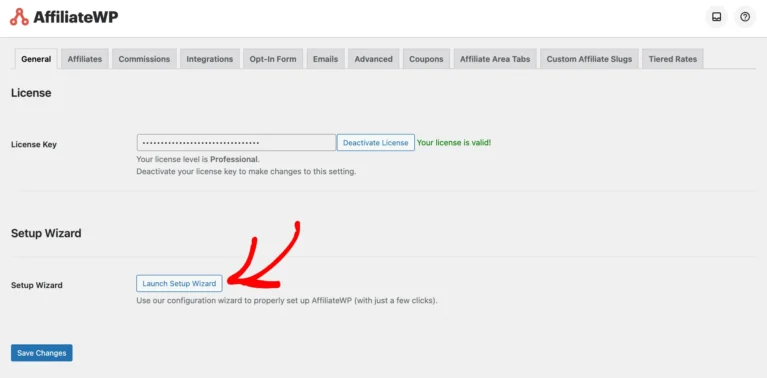
The setup wizard will allow you to integrate your e-commerce store with lots of popular WordPress plugins.
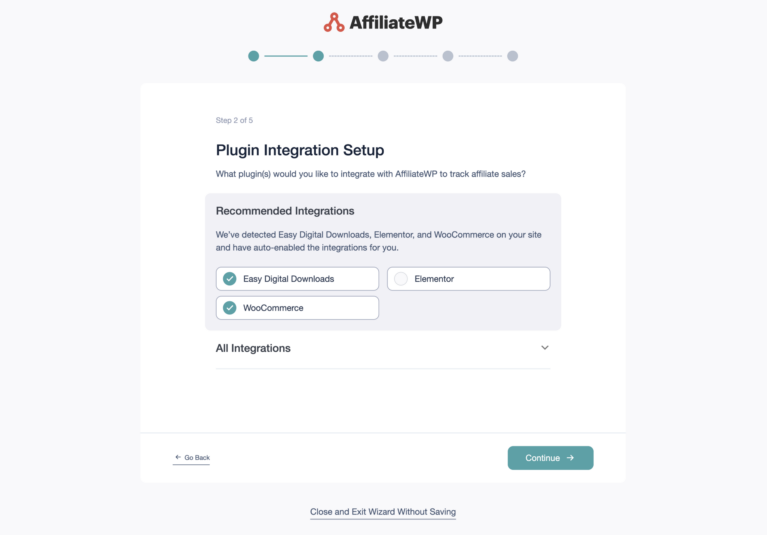
- WooCommerce
- Easy Digital Downloads
- MemberPress
- PayPal
- and many more.
You can then choose your commission structure and set your cookie expiration in just a few clicks!
Once you’ve completed the setup wizard, your affiliate program will be live and ready to track referrals.
Step 2: Edit Your Affiliate Signup Page
A great affiliate registration form is no use without a good registration page.
Signing up top affiliates isn’t that easy, so you need an affiliate signup page that stands out from the competition and converts.
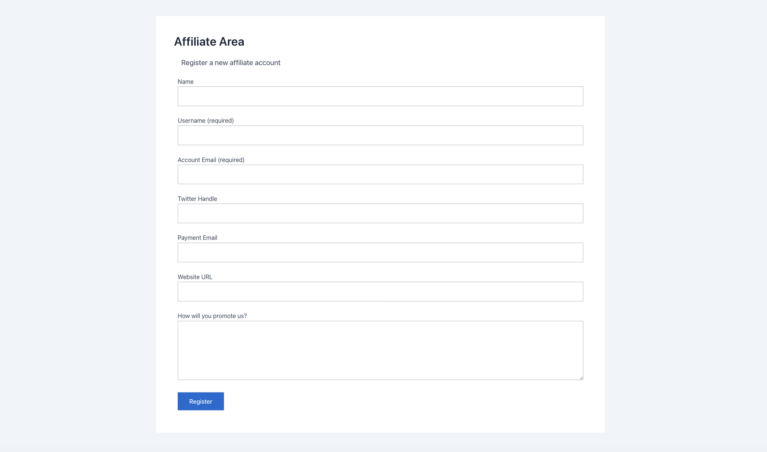
When you launch your affiliate program, AffiliateWP will automatically create an Affiliate Area page that serves as your affiliate signup and where affiliates log in to their affiliate accounts.
You can choose to use this page as your signup page, or, you can create your own landing page in WordPress.
To change your Affiliate Area page, simply go to your AffiliateWP settings and select a page from the dropdown menu in the Affiliate Area tab.
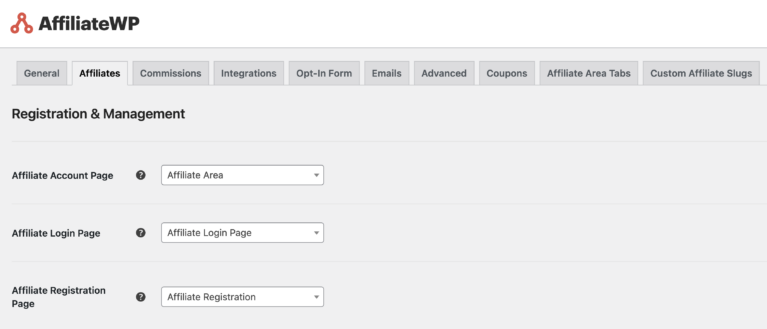
This gives you complete control over your affiliate signup page.
Step 3: Add the AffiliateWP Registration Block to Your Signup Page
If you’ve chosen to use the AffiliateWP Affiliate Area template page, then it will already have an affiliate registration form.
However, if you choose to create your own signup page, then you can add an affiliate registration form by typing “Affiliate” in your block’s search bar.
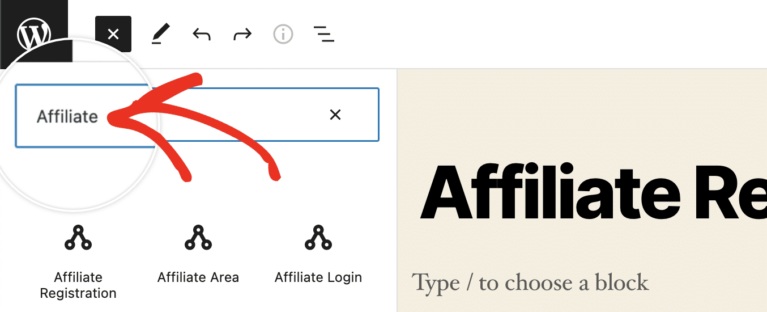
Then, select Affiliate Registration.
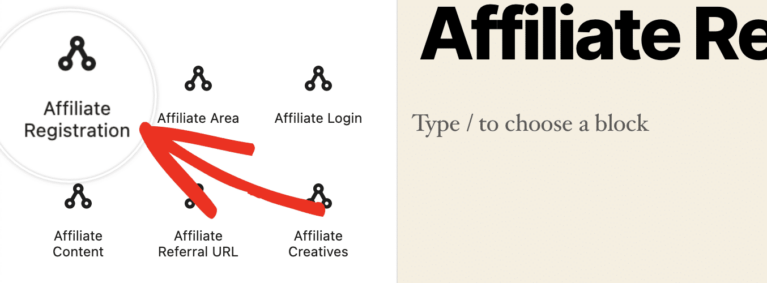
This will add the AffiliateWP registration form template to your page, and you can begin to customize it.
If you want the page to serve as both your registration and login page (which we recommend), the easiest way is to add the Affiliate Area block.
Step 4: Add, Rename, Reorder, and Delete Form Fields
It couldn’t be easier to customize your affiliate registration form.

- Add fields by clicking the Add Block button and choosing a block.
- Rename a field by clicking on the text and entering your new field name.
- Reorder fields by dragging them to the position you want them in.
- Delete fields by clicking the Options button and clicking Remove Name.
This means you can make your registration form program-specific and ensure you’re collecting the information you need from potential affiliates.

One option we highly recommend is adding the Affiliate Terms of Use block. This will allow you to select your terms of use page (or build your own using our terms of use generator) and show it in a scroll box.
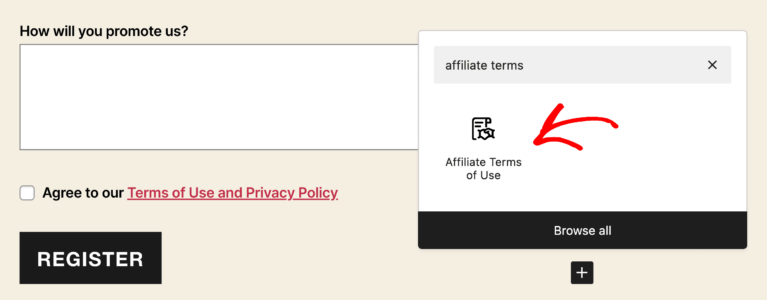
Affiliates can quickly read through your conditions and agree to your terms of use before submitting their application.
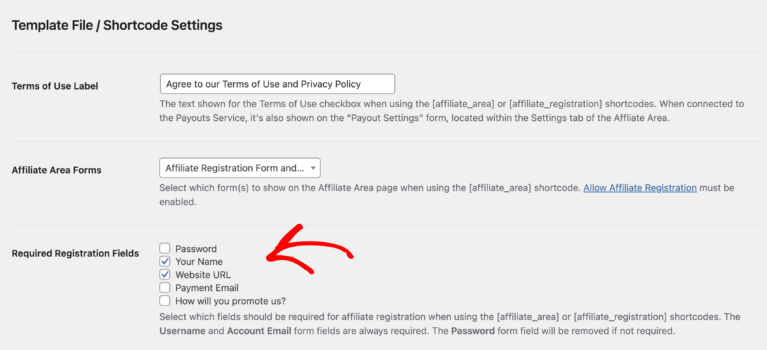
Note: You can also edit the affiliate signup form template from your AffiliateWP settings. Go to AffiliateWP » Settings » Advanced, and scroll until you see Template File / Shortcode Settings. Here, you’ll find the Required Registration Fields option, where you can use the checkboxes to customize your default registration form.
Step 5: Mark Fields as Required
Just because you ask people for information doesn’t mean they will give it to you.
You can put many fields on your form, but people will not likely fill them out unless they are required.
Setting a field as required means the form can’t be completed unless the field has been filled out, enriching the data you get from your form.
To mark a field as required, open the block settings by clicking the settings cog in the top-right corner, and click the Block tab. When you click on a field, you will now see a box titled Field Settings.
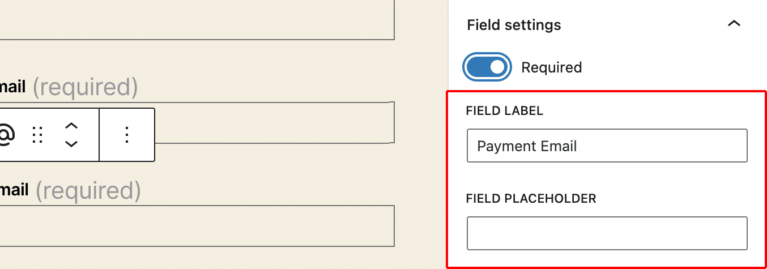
Mark the check box next to Required to make a field mandatory.
Step 6: Edit the Register Button
The last step is to edit the Register button, and you can do this simply by highlighting the text.
Choose the call to action that’s going to have maximum impact, and boost your conversion rate.
Now that your application form is complete, it should better reflect your business, attract high-quality affiliates, and help protect against fraud.
However, if you want to go even further, then you can integrate your form builder with our Ninja Forms or Gravity Forms pro addons.
Now Optimize Your Affiliate Signup Page
We would like to think of your affiliate signup page the same way we do a product page.
You’re trying to sell something, and your affiliate program landing page needs to reflect this. Use all the sales techniques you use to sell your products to sell your affiliate program.
There’s a lot of competition for affiliates, and you’ve got to stand out. The only way you’ll do this is if you have a great signup page and processes for signing up top affiliates.
Check out our handy guide on building your affiliate signup page!
You’ve got a great affiliate registration form, and now it’s time to ensure your signup page is a recruitment machine.
FAQs: How to Create an Affiliate Registration Form
An affiliate form allows affiliates to apply to be a part of your affiliate program. It might collect basic information like the affiliate’s name, email, website URL, and information on how they intend to promote products. Form submissions will be collected in your dashboard, and you’ll be able to approve the affiliate application.
An affiliate registration is where an affiliate signs up to an affiliate program. They will provide information about how they intend to promote the affiliate program’s products, and a program manager will use this information to decide whether the affiliate should be accepted.
The easiest way to start an affiliate marketing program is with AffiliateWP. It allows WordPress websites to set up affiliate marketing in just a few clicks. Once your program is ready, you’ll be able to work with innovative bloggers, social media influencers, and other marketers to grow your business.
You can edit your AffiliateWP registration form in WordPress’s page builder. Just choose the Affiliate Registration block and start editing. You can also edit your notification settings by going to the emails tab in your AffiliateWP settings.
Customizability Creates Affiliate Sales
One of the reasons AffiliateWP is the best WordPress affiliate plugin is its customizability, which, along with awesome functionality, helps grow sales.
The great news is it’s incredibly easy to set up. We give you complete control over your program (there are no limits on affiliates, creatives, or sales), but we also make it incredibly simple to manage.
This shows through our affiliate registration forms, which you can create in just a few clicks and easily customize.
Ready to take the next steps toward building an affiliate program? Here are some more resources:
- How to Get More Affiliates: 13+ Ways to Grow Your Program
- How To Set up Affiliate Marketing for Your SaaS Business (Guide)
- 15 Best Strategies To Recruit High-Performing Affiliates (Guide)
- 10 Best WooCommerce Affiliate Plugins for a Thriving Affiliate Program
- A Complete Guide to Setting Affiliate Commission Rates
Now, it’s time for you to create your first affiliate registration form and grow your program.

There is no option for enter password when affiliate registers. Now how affiliate will know what is his password when He will login? Useless plugin for this specific reason.
Hey Raees,
The password is automatically generated for an affiliate and sent to them. You also have the option to add a password field to the affiliate registration form which allows affiliates to choose their own password.
I learned a lot. I don’t have an affiliate account and i’m interested of creating nie. Can you please help me ?
Hey Sen – We’d be happy to help! When you get a chance, please drop us a line in support so we can assist.
If you have an AffiliateWP license, you have access to our email support, so please submit a support ticket.
Thanks 🙂
Go to AffiliateWP > Settings > General, scroll until you see Registration Fields, and use the checkboxes to customize your default registration form.
– This doesn’t exist anywhere.
Hey Joe – I apologize for any confusion! You can customize the default registration form by going to AffiliateWP > Settings > Advanced > Template File / Shortcode Settings > Required Registration Fields. In case you have any further questions, please feel free to submit a support ticket.