





Tired of the slow grind of acquiring new B2B customers?
You’re not alone. Many B2B companies invest heavily in expensive marketing campaigns and sales teams, only to see modest results and stretched budgets.
But what if you could have an army of experienced professionals (affiliates) actively promoting your product, bringing you qualified leads, and you only pay when they deliver results?
That’s exactly what a B2B affiliate marketing program can do for your business.
In this guide, I’ll show you how to build a B2B affiliate marketing program on WordPress that brings you consistent leads and sales without hefty marketing costs.
Does Affiliate Marketing Work for B2B?
If you’re running a B2B company, you might be skeptical about affiliate marketing.
After all, isn’t that just for eCommerce stores selling consumer products? I used to think the same, but the data tells a different story.
What surprised me is that between 15-30% of all sales for advertisers now come from the affiliate channel.
What makes B2B affiliate marketing particularly powerful is its ability to solve one of the biggest challenges in B2B: building trust and credibility.
When industry experts and thought leaders recommend your product, it carries more weight than any advertisement.
The numbers back this up too.
About 40% of U.S. companies now consider affiliate marketing their top channel for customer acquisition. And with the affiliate marketing industry projected to reach $15.7 billion by 2024, the opportunity is only growing. Yet surprisingly, only 18.6% of affiliate marketers focus on B2B offers – meaning there’s still plenty of room to gain a competitive advantage.
So is affiliate marketing good for B2Bs?
Yes, affiliate marketing works for B2B companies and it is highly recommended that you start an affiliate program for your business to grow without spending plenty on ads.
Steps to Launch a B2B Affiliate Marketing Program
Ready to get started? Below is the step-by-step process for starting an affiliate program with WordPress for your B2B business.
Step 1: Install AffiliateWP

First things first. You need the right tool to manage everything, and that’s where AffiliateWP comes in.
It’s the best affiliate management tool for running a professional B2B affiliate program on WordPress.
To get started head over to AffiliateWP’s pricing page. After you buy your plan, you’ll get an email with your login details. Log into your account, download the plugin, and grab your license key from the dashboard, you’ll need this in a minute.
Now, go to your WordPress site. Click on Plugins, then Add New, and Upload Plugin.
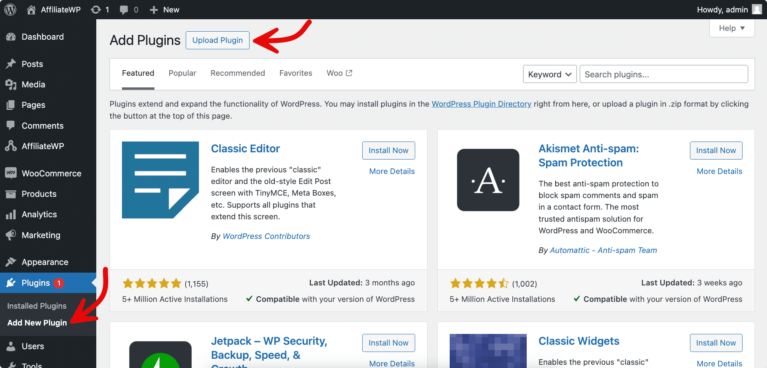
Choose the AffiliateWP file you just downloaded and hit Install Now. Once it’s installed, click Activate Plugin.
You’ll see AffiliateWP show up in your WordPress menu. Hover over it, click Settings, and paste your license key where it says License Settings. Don’t forget to hit Save Changes at the bottom.
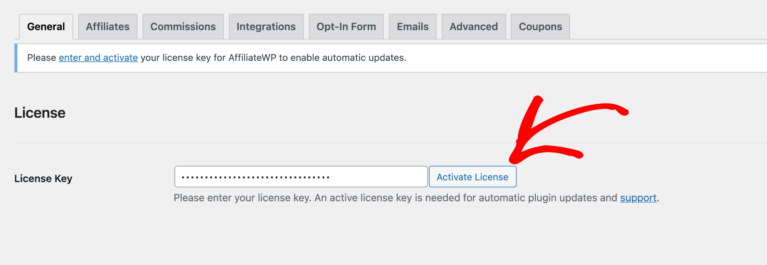
Yes, you’ll see lots of settings and options – but don’t worry about those yet. AffiliateWP’s setup wizard will walk you through everything else step by step.
Step 2: Launch Setup Wizard
Now that you’ve installed AffiliateWP, let’s set up your affiliate program settings.
First, at the bottom of the General Settings page, find Setup Wizard. As you have added your license key, click Continue and jump to the second screen.
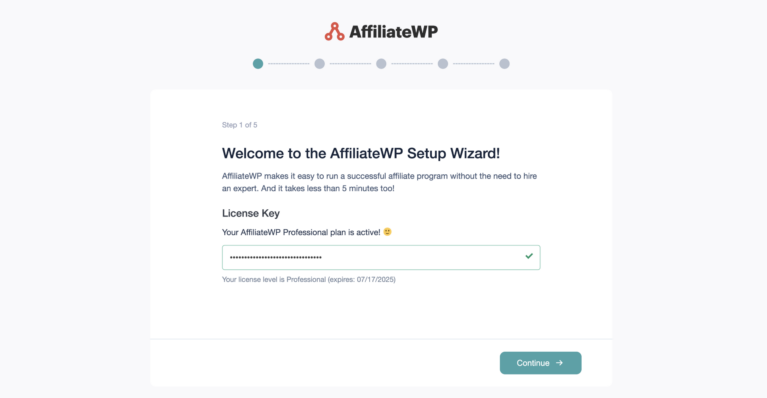
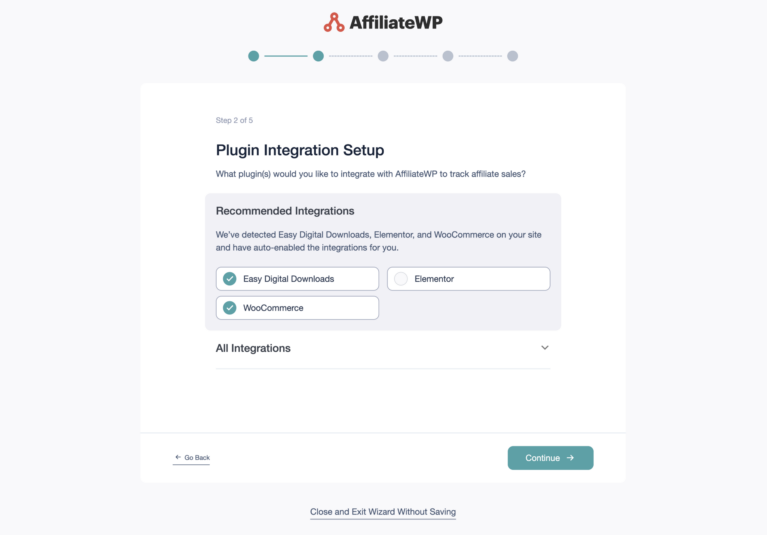
Next choose your integrations. Think about how you sell your B2B products or services. Are you Using WooCommerce? Easy Digital Downloads? Or maybe MemberPress? Just check the boxes next to the ones you use. This helps AffiliateWP track sales properly.
Next, choose how you’ll pay your affiliates. We cover the payout options in Step 5, and you can change them any time.
Pick what works best for your business.
Now its time to decide the commission settings. You can choose between a fixed amount (like $200 per sale) or a percentage (like 20% of each sale). For B2B, where deal sizes are usually bigger, many companies prefer percentage-based commissions.
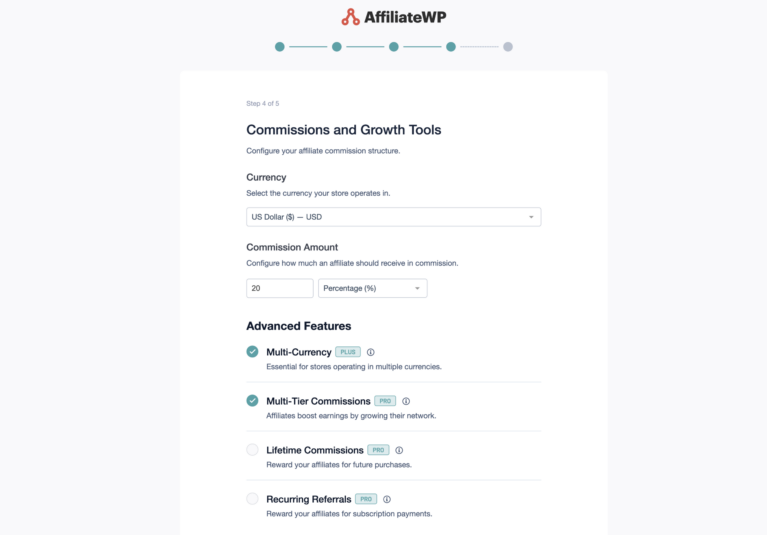
But don’t stress too much, you can always change this later as you figure out what works best.
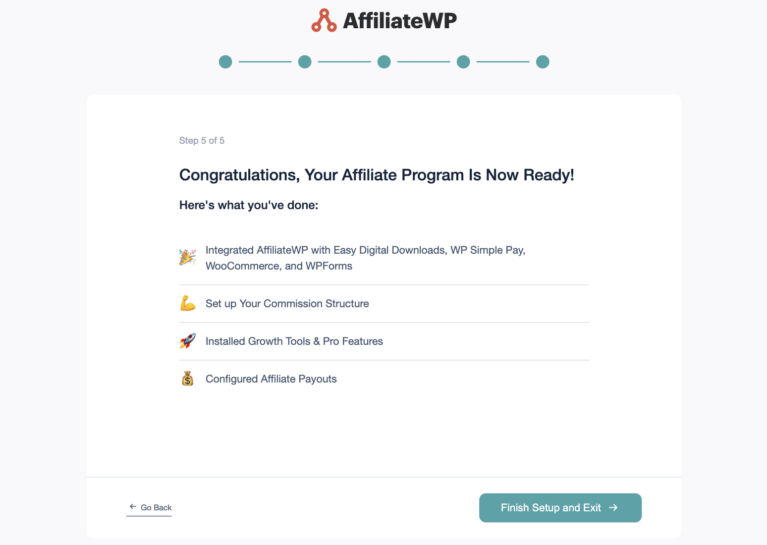
Once you’ve made these choices, just click Finish and Exit Wizard and you’re done!
Step 3: Customize Your Affiliate Area
Your affiliates need a professional space to manage their partnerships, and that’s exactly what we’ll set up now. AffiliateWP automatically creates an Affiliate Area page for you that matches your website’s look and feel.
Head over to AffiliateWP » Settings and look for the Affiliate Area dropdown. Here you can either stick with the default page or pick a different one.
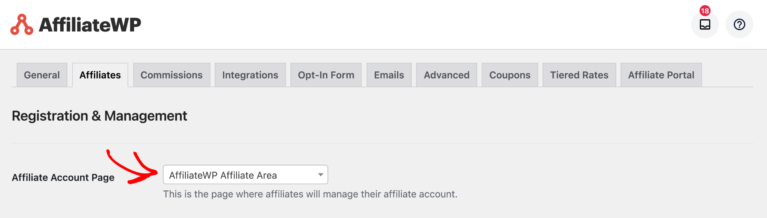
If you want to use your own page, just create it like any other WordPress page and select it here.
Affiliate Area is where your affiliates sign up, log in, and get everything they need to promote your B2B product. To customize the registration form go to Pages in your WordPress dashboard and edit the Affiliate Area page.

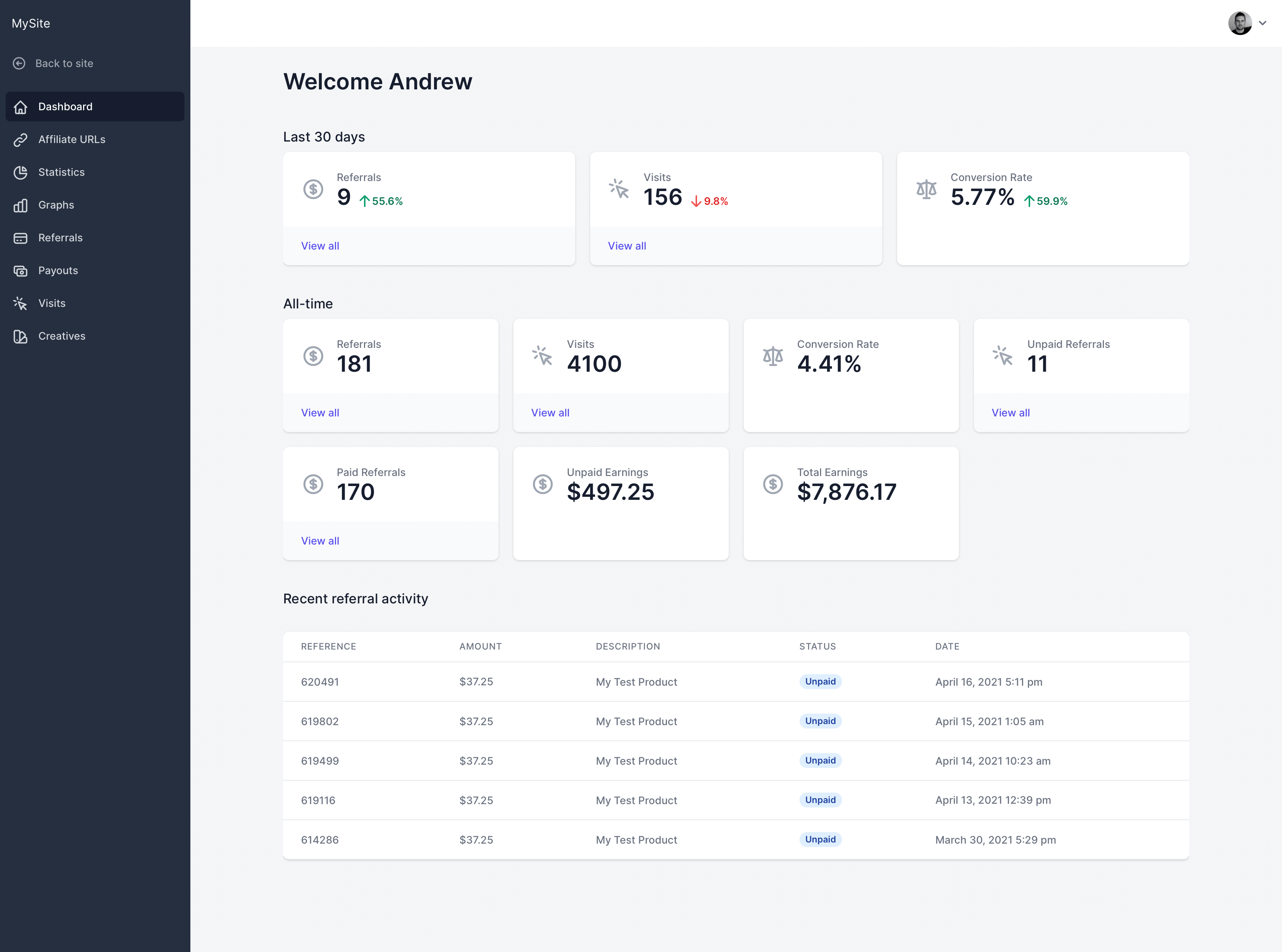
Once your affiliates log in, they’ll see their dashboard, where they can create affiliate links, grab marketing materials, and track their performance.
They can see exactly how many clicks they’re getting, what sales they’ve made, and when they’ll get paid.
Pro tip: If running a serious B2B program, consider upgrading to the Affiliate Portal addon (available with the Pro plan). It gives your partners an even more robust dashboard with advanced tracking and reporting.
Step 4: ManageYour Affiliates
AffiliateWP requires you to manually approve new affiliates by default.
Keep this setting on—it’s your first line of defense against low-quality partners who might harm your B2B brand.
To review new applications, go to AffiliateWP » Affiliates. Here, you’ll see all pending applications and can approve or reject them.
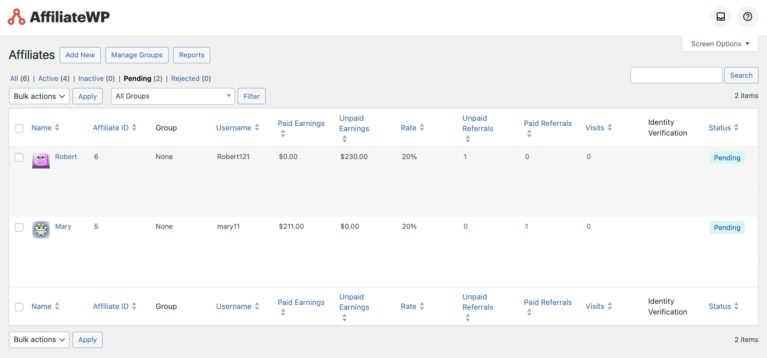
You’ll receive an email notification whenever someone applies, and they’ll receive one when you decide.
Want to customize these email notifications? Head to AffiliateWP » Settings » Emails. Use the checkboxes to control which notifications get sent and when.
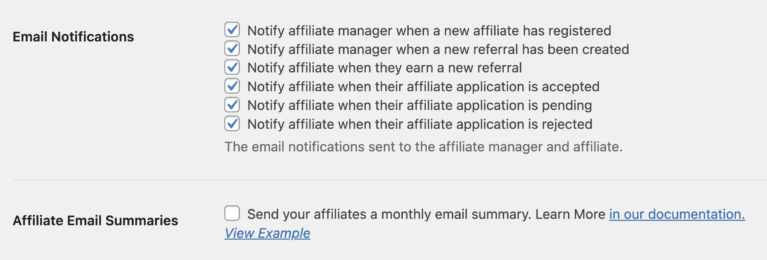
You can also change the email content. Make sure it sounds professional and fits your brand voice.
If you really want to auto-approve affiliates (though we don’t recommend it), go to AffiliateWP » Settings » Affiliates and uncheck Require Approval.

Step 5: Set Up Affiliate Payouts
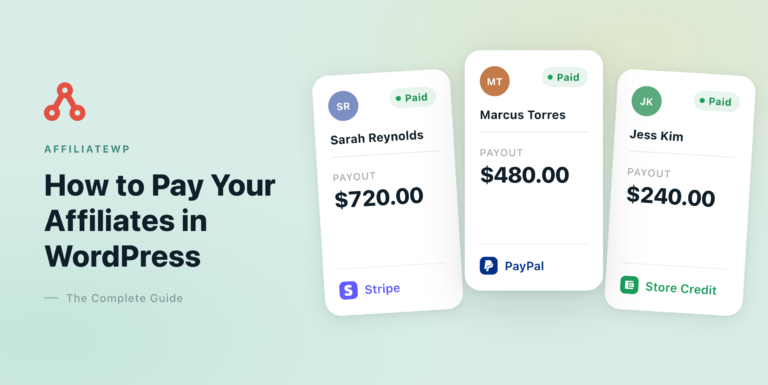
Setting up how you’ll pay your affiliates is crucial. AffiliateWP makes this simple with several built-in payout methods: Stripe, PayPal, store credit, and manual payouts.
To set them up, go to AffiliateWP » Settings » Payouts and turn on the methods you want to use:
- Stripe: Connect your Stripe account and turn Stripe on. Your affiliates then connect their payout details from their Affiliate Area.
- PayPal: Add your PayPal API credentials and turn PayPal on. Payments go to the payment email each affiliate saves in their Affiliate Area.
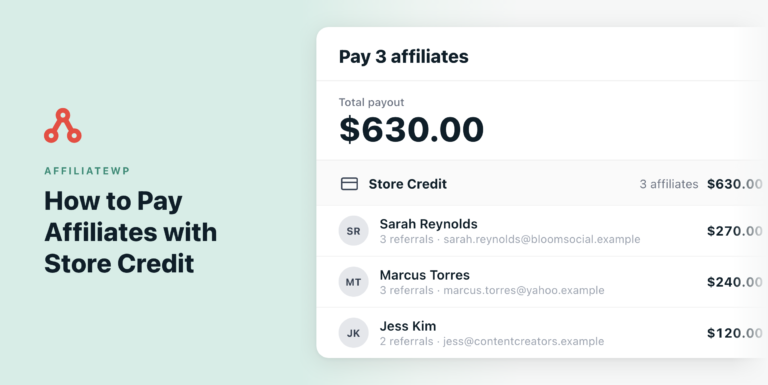
- Store Credit: Pay affiliates with credit they can spend in your shop. It works with WooCommerce, or with Easy Digital Downloads and the EDD Wallet extension.
- Manual payouts: Pay partners yourself by bank transfer or check, then mark their referrals as paid in AffiliateWP.
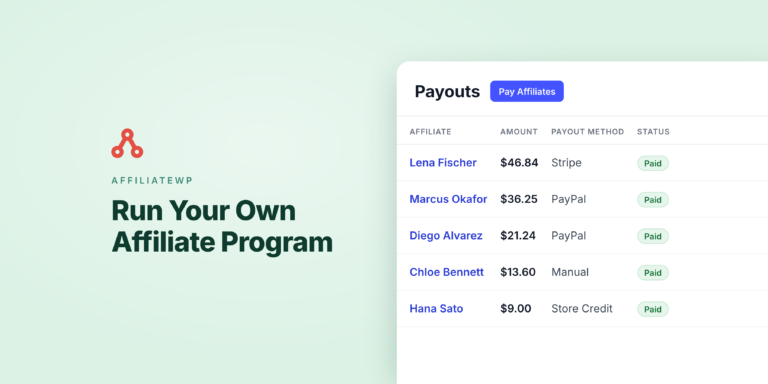
When it’s time to pay, go to AffiliateWP » Payouts and click Pay Affiliates. On the Pro plan, you can also schedule payouts from the Schedules tab, so your partners are paid automatically.
Step 6: Recruit Affiliates & Track
Now for the exciting part – getting great affiliates on board. Start with people who already know and use your B2B product. Reach out to industry bloggers, content creators, and influencers in your space.
They’ll promote your product more authentically because they understand its value.
Make your program attractive with competitive commission rates. For B2B products with higher price points, consider offering a lower percentage but a higher total payout.
You can even use AffiliateWP’s Vanity Coupon Codes addon to let affiliates create their own branded discount codes. Or use the Multi-Tier Commissions addon to let your affiliates build their teams and get higher incentives.
Also, track your program’s performance through AffiliateWP Reports.
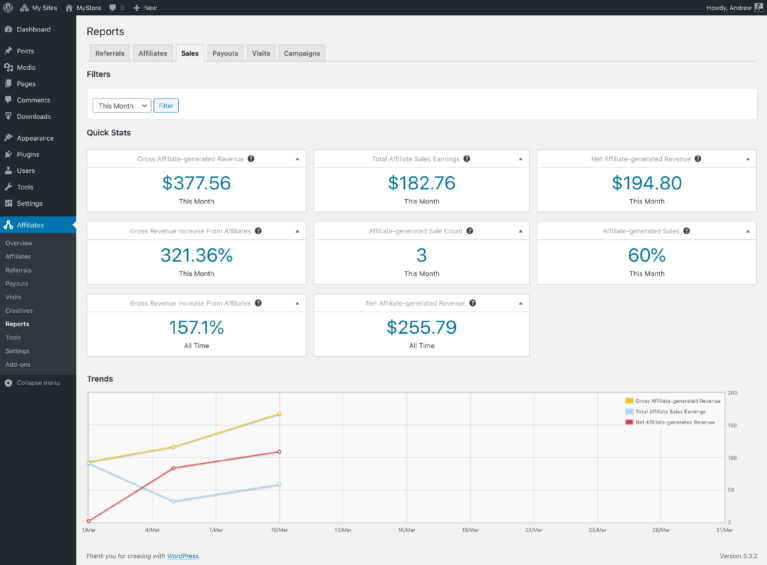
Monitor affiliate performance metrics like conversion rates and commission earnings. Use this data to spot your top performers and understand what makes them successful.
Remember to provide your affiliates with good marketing materials. Give them product descriptions, case studies, and testimonials they can use. The better equipped they are, the better they’ll perform.
FAQs
Most successful B2B affiliate programs pay between 15-30% commission on the first year’s contract value. Here’s why: While this might seem high, remember that B2B sales cycles are longer and deals are bigger.
The most costly mistake is treating B2B affiliate marketing like B2C. Many companies launch their program and try to get as many affiliates as possible, like they’ve seen B2C companies do. But in B2B, five engaged industry experts who understand your product will outperform 500 general affiliates every time. Focus on quality partnerships over quantity.
Be prepared for a 3-6 month ramp-up period. Unlike B2C where you might see instant sales, B2B affiliate marketing follows your normal sales cycle. Your first month might just be getting affiliates onboard and trained. Months 2-3 often involve affiliates creating content and starting conversations. By months 4-6, you should start seeing qualified leads coming in.
Get Your B2B Affiliate Program Running in Minutes
Starting a B2B affiliate program doesn’t have to be complicated or time-consuming. With AffiliateWP, you’re just minutes away from setting up a robust affiliate program that works seamlessly.
For B2B companies looking to grow their reach and only pay for actual results, affiliate marketing is a powerful strategy that just works.
Now that you know exactly how to launch your B2B affiliate program, here are some helpful resources to take it further:
- A Complete Beginner’s Guide to Affiliate Program Management
- How to Automate Your Affiliate Program in WordPress (Step-by-Step)
- 10 Powerful Benefits of Affiliate Marketing (For Businesses)
- How To Start an Affiliate Program for Health & Fitness Business (Guide)
- AffiliateWP vs. SliceWP: Which Is Better For Your Business
You now have everything you need to launch a successful B2B affiliate program.
Ready to grow your business with affiliate partnerships?
Ainda funciona esse serviço da affiliate wp com eficiência?
Hey Jonathas – AffiliateWP works efficiently and is actively maintained with regular updates to ensure seamless performance. It integrates well with popular eCommerce and membership plugins like WooCommerce, Easy Digital Downloads, MemberPress, and more.
If you’re considering using AffiliateWP and have specific questions about your setup or requirements, feel free to submit a support ticket.