Most loyalty programs give customers points. Points are useful, but they’re not personal. There’s nothing in a point balance that says “we know who you are.”
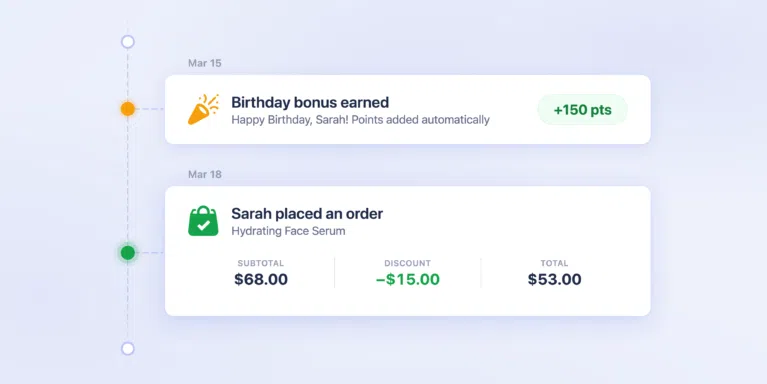
Birthday rewards are the simplest way to fix that. Your customer wakes up to an email: “Happy Birthday! 150 points on us.” They tap “Browse Rewards” and land straight on the redemption panel with their bonus already in their balance.
They pick a reward, redeem their points for a discount, and place an order they wouldn’t have made otherwise.
Birthday Rewards is a new earning method on the RewardsWP Pro plan. Configure it once, and it runs every year for every customer who has a birthday on file.

How Birthday Rewards Work: From Email to Purchase
The Email That Starts the Visit
Each morning, RewardsWP checks for customer birthdays. Anyone celebrating has their bonus points added to their balance and receives a dedicated birthday email: “Happy Birthday! Here’s a little something to celebrate your special day.”
This isn’t a generic “you earned points” notification. The subject line uses their name. The email shows their birthday bonus, their updated balance, and a “Browse Rewards” button that takes them straight to the redemption panel, where they can turn those points into a discount.
Your customers are already in a spending mood on their birthday. The email gives them a reason to spend it with you.

The Store Visit That Turns Into a Sale
When a customer clicks through from the email, they land straight on the redemption panel with their bonus points already in their balance. They pick a reward, apply a discount, and check out.
If they visit your store on their own instead, they open the Rewards Widget and a celebration banner greets them by name: “Happy Birthday Sarah! Enjoy 150 Points on us.” Either way, the points are there.
No pop-ups, no interruptions. The reward is waiting however they arrive.
The customer feels recognized. They have points to spend. They’re already on your site.
That combination is why birthday automations outperform every other email type by such a wide margin.
Customers Enroll in Seconds
Customers see “Celebrate your birthday” in the Ways to Earn section of the Rewards Widget. They tap it, pick their month and day from two dropdowns, and they’re done.
Once saved, the widget shows their birthday with a confirmation: “You’ll earn 150 Points on March 15.” One interaction, and they’re enrolled for every birthday going forward.

RewardsWP only collects the month and day. No birth year. This is a deliberate privacy-first design.
Your customers share just enough for you to celebrate them, nothing more. Birthday data is fully integrated with WordPress’s built-in privacy tools, so export and erasure requests are handled automatically.
Set It Up in Under a Minute
One Toggle, One Number
Navigate to RewardsWP → Settings → Points, open the Ways to Earn drawer, and enable “Birthday bonus.” Set your points amount (default: 150), and you’re done.

RewardsWP handles everything else. The daily birthday check runs automatically, emails send automatically, and points deposit automatically. You configure it once and forget about it.
No Gaming, No Manual Rules
Birthday rewards need guardrails. RewardsWP includes three layers of protection, all active by default:
- 30-day advance notice. Customers must set their birthday at least 30 days before the date. Nobody can create an account and claim birthday points the same week.
- Once-per-year limit. Each customer receives birthday points exactly once per calendar year. The system tracks this automatically.
- Locked after first reward. Customers can update their birthday until they receive their first birthday points. After that, it’s permanently locked. You can still edit it from their profile if a correction is needed.
You don’t need to configure any of this. It works out of the box.
Track Every Birthday Reward
Every birthday reward appears in your activity dashboard, filterable by source. You can see exactly who received birthday points and when. Each customer’s profile shows their birthday (if set), and you can edit it directly from the member detail modal.
Getting Started
- Update RewardsWP to the latest version (Pro plan required).
- Go to RewardsWP → Settings → Points, open Ways to Earn, and enable Birthday bonus.
- Set your points amount and save. Customers will start seeing the birthday option in the Rewards Widget immediately.
Your first birthday points will go out the next time a customer’s birthday matches the calendar. In the meantime, the “Celebrate your birthday” prompt in the widget starts collecting dates right away. For the full setup walkthrough, check the Birthday Reward documentation.
Birthday Reward is available on the RewardsWP Pro plan. If you have questions or ideas for how we could make birthday rewards even better, we’d love to hear from you.