





The birthday reward automatically gives members bonus points on their birthday each year. This guide explains how to enable and configure birthday reward as a store admin, and how members add their birthday, receive their points, and experience the birthday celebration in the rewards widget.
Requirements: You will need a Pro license to access the Birthday reward feature.
What is the birthday reward
Birthday reward give members a one-time annual bonus. Points are automatically added to their account on their birthday every year. It’s a simple way to recognize members on a personal milestone and give them an extra reason to visit your store.

Members set their birthday (month and day only, no birth year is collected) in the rewards widget. Points are then awarded automatically on their birthday each year, and members receive a birthday email and a celebration experience in the rewards widget.
Enable birthday reward
To add birthday reward as an earn action, navigate to RewardsWP » Settings, click the Points tab, and click the Add ways to earn button. From the slide-in drawer, click Birthday bonus to expand its settings.
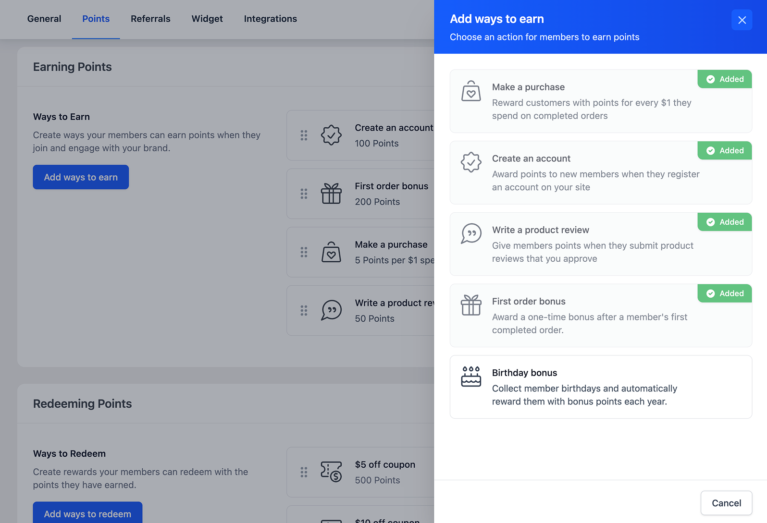
Here you’ll see two options:
- Status: Toggle this on to enable/disable the birthday earn action. Members will immediately see the birthday card in their rewards widget.
- Points to award: The number of points members receive on their birthday each year. The default is 150. This is the amount members see when they preview their upcoming birthday reward in the panel.
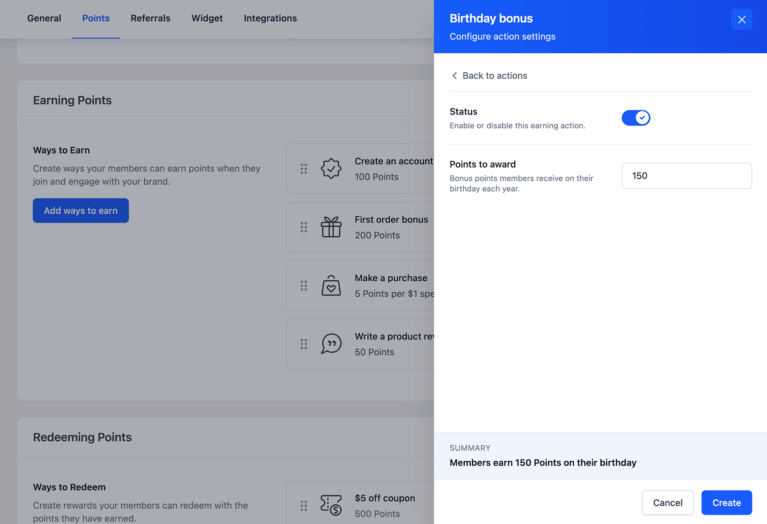
Click Save Changes. Once enabled, the birthday reward appears in the rewards widget for all members.
How members add their birthday
From the rewards widget, members find the Celebrate your birthday action card and click Add to open the birthday picker. Members select their Month and Day from the dropdowns, then click Set my birthday to save.

The panel immediately shows a preview of when they’ll earn their points.

30-day minimum rule: To prevent abuse, members must set their birthday at least 30 days before that birthday date to qualify for points in the current year. If a member sets their birthday fewer than 30 days away, their reward preview will show next year’s date as their first eligible reward. This does not affect future years. Once the birthday is saved, points are awarded every year automatically.
How and when points are awarded
Birthday points are awarded automatically. No manual action is needed once the feature is enabled.
- Timing: Points are added to the member’s account on their birthday each year.
- Frequency: Once per calendar year. Members who have already received their birthday points this year won’t receive them again until next year.
- Process: RewardsWP runs a daily background task that checks for members whose birthday falls on the current date and awards points to those who haven’t yet received them this year.
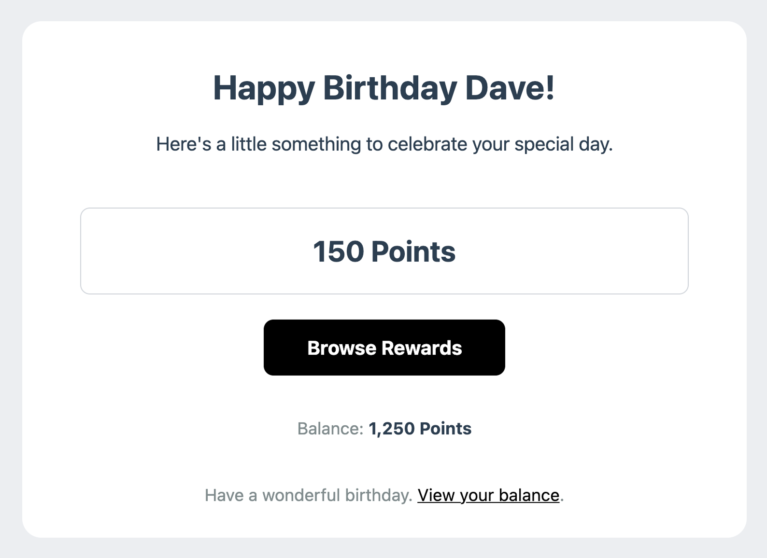
- Email notification: Members receive an automated email when their points are added. The subject reads: “Happy Birthday, [Name]! [Points] birthday bonus added.”
February 29 birthdays: Members born on February 29 receive their birthday points on February 28 in non-leap years.
Birthday email
When birthday points are awarded, RewardsWP automatically sends the member a birthday email. This is the primary way members are notified their points have arrived, it drives them back to your store to redeem a reward.
Frequently asked questions
Their birthday is saved, but they won’t receive points for that upcoming birthday date. Their reward preview will show next year’s date as their first eligible reward. From that year forward, they’ll receive points automatically every year.
Members can update their birthday once before they’ve ever received birthday points. After their first birthday reward, the birthday is permanently locked. To correct a locked member’s birthday, edit it directly from RewardsWP » Members in the admin. Admin edits bypass the lock.
Yes. Birthday points are awarded once per calendar year for as long as the birthday reward action is enabled. Members don’t need to do anything after setting their birthday. Points are added automatically each year.
No new points will be awarded on members’ birthdays while the action is disabled. Their saved birthday dates are preserved. If you re-enable the action later, they’ll resume receiving points on their next birthday.
Members with a February 29 birthday receive their annual birthday points on February 28 in non-leap years. No action is needed. This is handled automatically.
That’s it! Birthday reward are a hands-off way to recognize members on their special day and keep them engaged year after year.