New in RewardsWP: Points, Redesigned Rewards Widget & More
RewardsWP now includes Points, a redesigned Rewards Widget, and new tools to launch, run, and measure loyalty and referrals in one place.
Continue Reading →
RewardsWP now includes Points, a redesigned Rewards Widget, and new tools to launch, run, and measure loyalty and referrals in one place.
Continue Reading →
Your Friday afternoons just got shorter. No more CSV exports. No more bank portal logins. No more “when will I get paid?” emails clogging your support queue. Starting today, you can pay your affiliates directly from your WordPress admin with AffiliateWP Stripe payouts — single click, instant delivery, zero spreadsheets.

If you’ve been using PayPal Payouts, you already know the magic of one-click payments. Now AffiliateWP Stripe Payouts brings that same simplicity—perfect for affiliates who prefer bank transfers over PayPal or when you want to keep everything in the Stripe ecosystem.
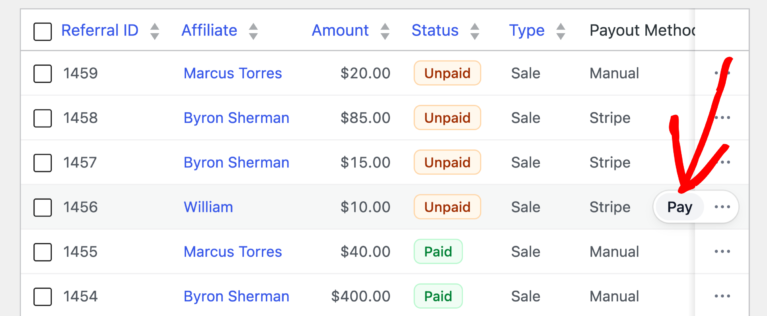
Here’s how it works: Click “Pay via Stripe.” Done. Just like PayPal Payouts, but through Stripe.
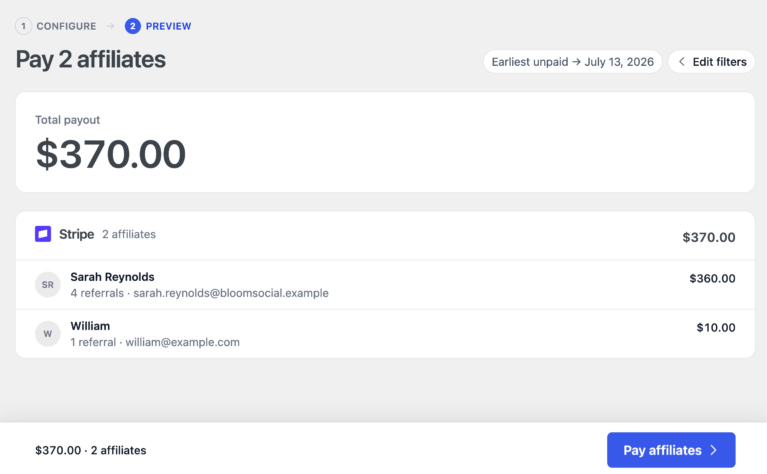
Whether you’re paying one affiliate who just hit their threshold or processing your monthly batch of 500, the workflow stays dead simple. Find the referral, click pay. Or select your date range, choose Stripe, review, and send them all at once.

Fast payouts aren’t just convenient—they transform your affiliate program:

Option 1: From the Referrals page
Option 2: From Pay Affiliates (for date ranges)
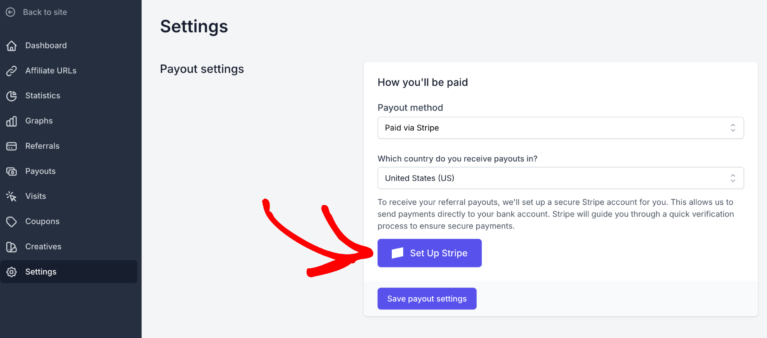
Your affiliates connect once and they’re set forever. No forms to fill out on your site. No sensitive data in your database. Just Stripe’s secure, compliant flow that handles everything:

After connecting to AffiliateWP Stripe Payouts, affiliates get their own Stripe Express Dashboard where they can track payments, update banking details, and download tax forms. If you’ve enabled schedule editing in your Stripe platform settings, they can also manage their payout schedule. You never touch their financial data.

About timing: Funds land in your affiliate’s Stripe balance immediately. Bank deposits then follow the payout schedule set in Stripe and usually arrive in 1 to 2 business days, depending on country and bank. First payouts for new accounts can take longer while Stripe completes verification.
AffiliateWP Stripe Payouts validates everything before money moves—saving you from the nightmare of failed transfers and angry affiliates.
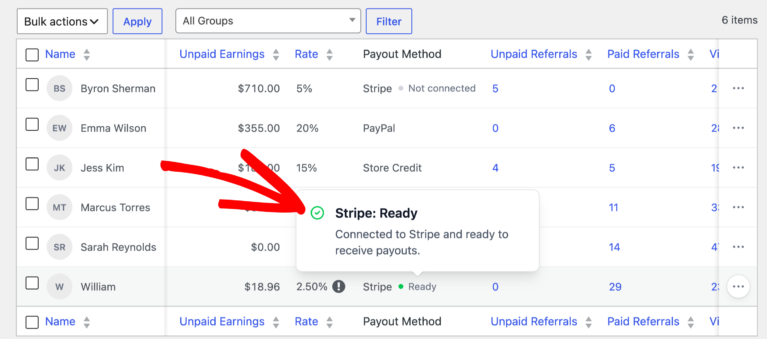
The Affiliates list shows each person’s Stripe status instantly:

Click into any affiliate to see their complete Stripe account status:

When you click “Pay via Stripe,” the system runs real-time checks:

With webhooks enabled, these statuses update automatically. When an affiliate completes verification or fixes an issue, you’ll know instantly. No manual checking, no failed payments, no wasted time.
Enable webhooks and let AffiliateWP Stripe Payouts handle the communication:
Every template is customizable.
Nervous about your first payout? Don’t be. Sandbox Mode lets you test the entire AffiliateWP Stripe Payouts flow:
Every feature works in test mode, including a special Test Funds tool that lets you add funds to practice with—no real money needed.

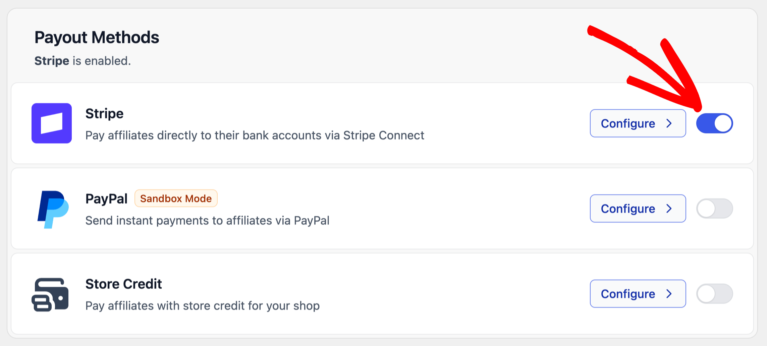
Here’s something else that’s new: we’ve completely reimagined how you manage payout methods in AffiliateWP. Everything now lives in a dedicated Payouts tab in your settings—no more jumping between plugins or hunting for options.
We’ve also brought PayPal Payouts and Store Credit directly into AffiliateWP. That means:
If you’re currently using the PayPal Payouts or Store Credit addons, you can safely delete them after updating to AffiliateWP 2.29.0—everything’s built in now.
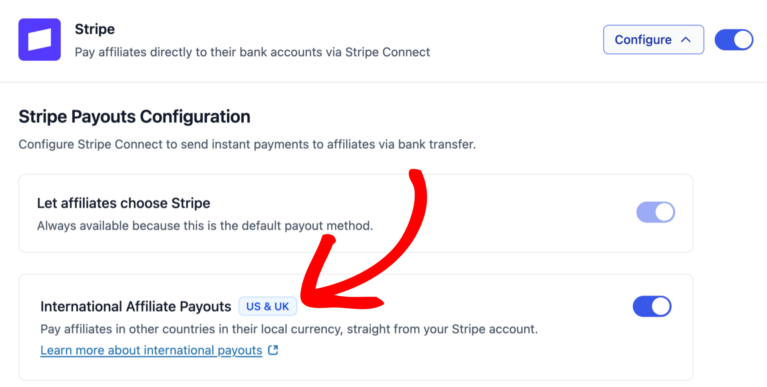
Not yet. AffiliateWP Stripe Payouts currently supports domestic transfers only. Your Stripe platform account and the affiliate’s connected Stripe account must be registered in the same country. To pay international affiliates, use PayPal Payouts or Manual Payouts. We’re exploring support for Stripe’s cross-border payouts for eligible US platforms, but there’s no timeline to share.
Funds land in the affiliate’s Stripe balance immediately. Bank deposits then follow the payout schedule set in Stripe. On a daily schedule, deposits usually arrive in 1 to 2 business days depending on country and bank. First payouts for new accounts can take longer while Stripe completes verification. Affiliates can see their expected payout date in Stripe Express.
Payments paused: The affiliate can’t receive new payments through your platform until required info is provided or a risk review clears.
Payouts paused: The affiliate can still receive funds into their Stripe balance, but can’t transfer to their bank until they resolve the issue. You may choose to wait, or pay knowing the funds will sit in Stripe until they finish verification or fix the problem.
Yes, if you allow it in your Stripe Connect settings. Affiliates can choose daily, weekly, monthly, or manual in the Stripe Express Dashboard where those options are available for their country. You can also set or lock the schedule at the platform level if you prefer consistency.
For current Stripe Connect fees in your country, please see Stripe’s official pricing page
Yes. Manual Payouts (CSV export) is still available. Stripe Payouts is an additional option. Use it when it saves time; stick with your current process when it doesn’t.
Yes. Affiliates can connect to Stripe and see their connection status from either the Affiliate Area or the Affiliate Portal. Payout schedules and tax forms are managed in the Stripe Express Dashboard.
When using AffiliateWP Stripe Payouts, Stripe handles tax documentation through their Connect platform. US affiliates can access and download their 1099 forms (when applicable) directly through their Stripe Express Dashboard. Stripe generates these forms based on payment thresholds established by tax regulations. This removes the administrative burden of tax form management from your responsibilities.
Stop losing Fridays to manual payouts. With AffiliateWP, you can send Stripe payouts in a couple of clicks and keep every affiliate happy.
Already using AffiliateWP? Follow our Stripe Payouts setup guide.
Disclosure: Our content is reader-supported. This means if you click on some of our links, then we may earn a commission. We only recommend products that we believe will add value to our readers.
Launch your affiliate program today and unlock a new revenue channel to grow your business faster.
We use cookies to improve your experience on our site. By using our site, you consent to cookies.
Manage your cookie preferences below:
Essential cookies enable basic functions and are necessary for the proper function of the website.
Statistics cookies collect information anonymously. This information helps us understand how visitors use our website.
Marketing cookies are used to follow visitors to websites. The intention is to show ads that are relevant and engaging to the individual user.
There are two pricing columns on the Stripe page: “Stripe handles pricing” and
“You handle pricing”. Which column applies with this integration and which of the fees are actually incurred when making a payout? Thanks!
Hey Jeremy,
Thanks for your question. Our integration uses Stripe Connect with Express accounts, which falls under the “You handle pricing” column on Stripe’s pricing page. This is the only supported model for our integration, and here’s what it means:
This is the standard pricing model for platforms using Stripe Connect with Express accounts, offering a cleaner experience for your affiliates while giving you control over your fee structure.
Hope that helps
2 Questions
1. In your FAQ you state : Can I pay international affiliates with AffiliateWP Stripe Payouts?
Not yet. AffiliateWP Stripe Payouts currently supports domestic transfers only.
My Question : We are a UK based company with customers and affiliates in the Europe. We need to be able to payout to those affiliates – is that possible ? –
Question 2 Can we automate on a weekly schedule for payouts ? So we dont manually need to go in and do anything admin wise.
Hey Patrik – As a UK-based business, you can use AffiliateWP Stripe Payouts to send commissions to affiliates across Europe. Stripe allows for Euro (EUR) payouts to EU bank accounts, though there may be some country-specific requirements depending on where your affiliates are based.
Additionally, at the moment, Stripe Payouts via AffiliateWP does not support automated/scheduled payouts — payouts need to be manually initiated. That said I’ve added your request to our internal feature request tracker so our team can consider it for a future update.