You run a WooCommerce or Easy Digital Downloads store, and the customers who come back are the ones who keep it going. You’d like to give them a reason to return, and a reason to tell their friends, without signing up for a hosted loyalty app. That’s usually when RewardsWP comes up.
RewardsWP is a WordPress plugin that runs a customer loyalty and refer-a-friend program on your own store. Customers earn points for buying, signing up and leaving reviews, swap those points for coupons or free products, share a referral link that rewards them and their friend, and climb VIP tiers that pay more on every order.
Everything happens inside WordPress. Your customers see it in a rewards widget on your storefront, and you run it from the RewardsWP menu in your dashboard, next to your orders.
In this guide, I’ll explain what RewardsWP is, who it suits, how points, referrals and VIP tiers work, what your customers see, which plan includes what, and how it relates to AffiliateWP. I’ll also be upfront about where it stops.
The short version
- What it is: a self-hosted WordPress plugin for a customer loyalty program, a refer-a-friend program and VIP tiers, all in one.
- Where it works: WooCommerce or Easy Digital Downloads, one store plugin at a time.
- What customers get: points they can spend on coupons, free shipping or free products, a referral link that rewards both sides, and tiers with their own perks.
- What it costs: RewardsWP Lite is free. Basic, Plus and Pro are yearly licenses, and VIP tiers, birthday rewards and free product rewards are on Pro.
- How it relates to AffiliateWP: a separate plugin from the same team. AffiliateWP pays partners a commission; RewardsWP rewards your customers.
What RewardsWP is, and what it isn’t
RewardsWP puts three programs behind one customer record. Points reward repeat purchases, referrals reward customers who bring in a friend, and VIP tiers reward the customers who spend the most. Because they share the record, a single order can earn points, complete a referral and move someone up a tier at once.
It’s a plugin, not a hosted service. Your members, their points and their referrals live in your WordPress database, and the widget is part of your own site rather than a script loaded from somewhere else. You pay a yearly license, with no monthly fee and no charge per order or per member.
RewardsWP isn’t an affiliate program. It doesn’t pay commissions in cash, track bloggers or influencers, or send payouts. Every reward a customer earns is either points or a coupon they use at your checkout. If you want to pay partners for the sales they send, that’s AffiliateWP, and our guide to affiliate marketing versus referral marketing explains the difference in more detail.
Who RewardsWP is for, and who it isn’t for
RewardsWP suits stores where a second, third and fourth order is a natural thing to ask for. Skincare, coffee, supplements, pet food, crafts supplies and digital products with regular releases all fit, because the points only mean something when there’s another purchase to spend them on.
It also suits stores whose happiest customers already talk about them. A referral link with a reward on both sides turns that word of mouth into orders you can see, credited to the customer who sent them.
It’s a weaker fit for a catalog people buy from once, such as a single high-ticket item. There, points have little to work with, so I’d run the referral program on its own and leave points switched off.
It’s built for stores on WordPress: RewardsWP runs on a self-hosted WordPress site with WooCommerce or Easy Digital Downloads.
How RewardsWP works
You set the program up once, under RewardsWP » Settings. The Points, Referrals and VIP tabs hold the rules, and the Widget tab controls how the program looks to customers. A setup wizard walks you through the first version when you install the plugin.
From then on, RewardsWP watches your store’s orders and applies the rules for you. Here’s what each part does.
Points and ways to earn
Points are the everyday reward. You choose what earns them on the Points tab, in the Ways to Earn list, and give each action its own value. RewardsWP comes with five: making a purchase, creating an account, a first order bonus, writing a product review, and a birthday bonus.
Purchase points are based on the order subtotal, without tax or shipping, and rounded down. So at 5 points per $1, a $78 order earns 390. On Basic and above you can rename the points too, which is why the store below calls them Face Points.

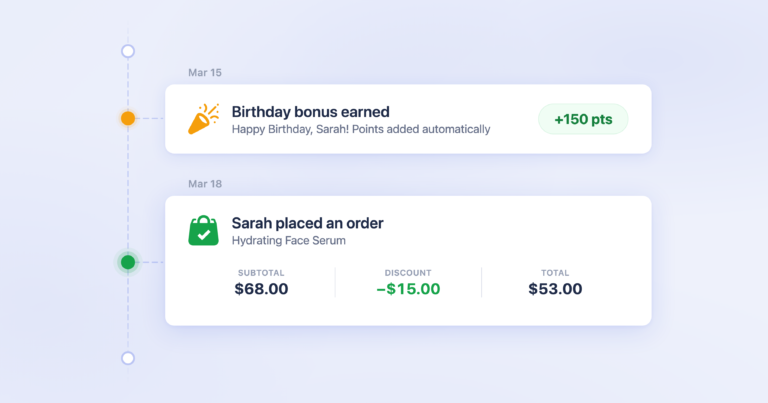
Purchase points start as pending when an order is placed, and RewardsWP approves them once the order is paid, so points only count for orders that go through. Reviews can be limited to verified buyers, and on Easy Digital Downloads they need the EDD Reviews extension. The birthday bonus is on the Pro plan: customers add their birthday in the widget, and it has to be set at least 30 days before the day it pays out.
Ways to redeem points
Earning only works if spending feels worth it. The Ways to Redeem list on the same tab sets what customers can trade their points for, and how many points each reward costs.
There are four kinds of reward: a fixed amount off, a percentage off, free shipping, and a free product. When a customer redeems, RewardsWP creates a coupon for them and can apply it to their cart. The list below runs from a $5 coupon at 500 points up to 15% off at 1,500, with a free Hydrating Rose Mist in between.

A spread of prices like that gives a new member something to reach after one or two orders, and a regular something to save for. On Basic and above, points can also expire after a period you choose, from 30 days to 2 years, and RewardsWP emails members before their points run out.
Refer-a-friend rewards
Every member gets their own referral link, which they can copy or share by email, X or Facebook from the widget. When a friend uses it and places their first order, the member who shared it earns a reward.
You set both sides of that deal on the Referrals tab, under Referral Rewards. The Advocate Reward goes to the member who shared the link, and the Friend Reward goes to the friend on their first order. Here, the advocate gets a free Hydrating Rose Mist and the friend gets a free Deluxe Sample Set.

The advocate can be rewarded with points or a coupon. The friend always gets a coupon, never points, and only a new customer can claim one. RewardsWP also blocks self-referrals and repeat claims from the same IP address, so the reward goes to real new customers. Referral visits are remembered for 30 days by default, and you can change that on the same tab.
If you’d like the referral side in more depth, our refer-a-friend guide covers it, and free product rewards explains how a product works as a reward.
VIP tiers
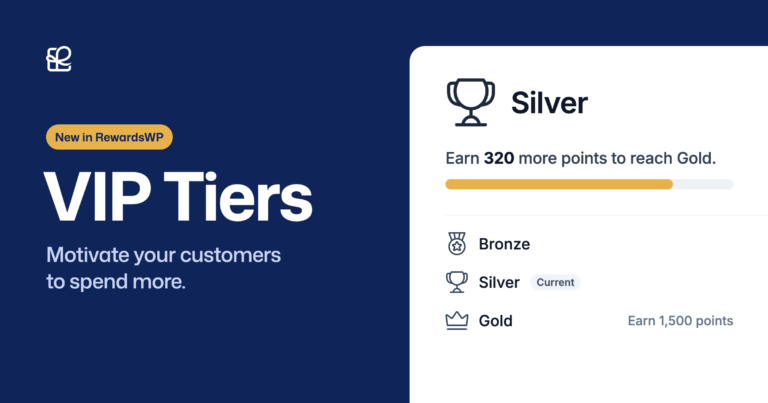
VIP tiers give your best customers a status to keep. You set them up on the VIP tab, and the first decision is how members qualify. The Qualification card offers three measures: total amount spent, points earned, or completed referrals, and the same measure applies to every tier.
The same card sets the Demotion Grace Period. With 30 days, a member who falls below their tier has a month to catch up before they move down, and RewardsWP emails them when that window starts.

Each tier then gets a threshold, a points multiplier, perks, and an Entry Reward that’s issued once, when a member arrives. Below, Bronze is where everyone starts, Silver begins at $250 spent with 1.5 times the points and a $5 coupon, and Gold begins at $500 with double points and a free Golden Hour Vitamin C Serum.

One detail worth knowing: the multiplier boosts purchase points only. A review or a birthday bonus is worth the same at every tier. VIP tiers are on the Pro plan, and the VIP Tiers announcement walks through a full example.
What your customers see: the rewards widget
Your customers never visit a separate rewards site. A Rewards button sits in the corner of your store, and it opens a panel with everything the program offers. Visitors who aren’t members yet see an invitation to join, with buttons to join or sign in.
A signed-in member sees their balance first. Hana Kim, a Silver member, has 1,250 Face Points, two rewards waiting, and a progress bar telling her she needs to spend $182 more to reach Gold.

That $182 comes straight from her orders. She’s spent $318 in four orders, and Gold starts at $500, so the widget counts down the difference for her.
Opening Ways to redeem shows every reward with its price in points and a Redeem button. Rewards she can’t afford yet stay visible but greyed out, which gives her a target rather than hiding it.

The VIP status panel explains her tier in plain terms: the progress line to Gold, the benefits Silver gives her, and the welcome gift she received when she reached it. Further down, she can see what every tier unlocks and what it takes to get there.

The Refer your friends section shows both sides of the referral deal before she shares anything, so she knows what she and her friend each get. Her link is ready to copy, or to send by email, X or Facebook.

Members also get an activity history of the points they’ve earned and spent and the friends they’ve referred, so they never have to ask you for their balance. The points history post shows that view.
You can match the widget to your brand on the Widget tab: the brand color, the program name, the welcome heading, and where the launcher sits and what it says. The widget stays off the WooCommerce checkout page, so it never gets between a customer and paying.

Alongside the widget, RewardsWP sends members emails at the moments that matter: when they earn points or redeem a reward, when a friend’s referral pays off, when their points are about to expire, and when they reach a tier, risk losing it, or move down. You’ll find them all under RewardsWP » Emails, each with its own on and off switch.
Running the program day to day
Once the rules are in place, most of your time in RewardsWP is spent looking, not configuring. Four screens do most of the work.
Members lists everyone in the program with their referral revenue, referrals, points balance and VIP tier. It’s the quickest way to see who your best customers are, and you can open any member to adjust their points by hand.

Points is the ledger. Every entry shows the member, the points earned or spent, and the order total behind it, so you can trace any balance back to the orders that built it.

Referrals lists each referred friend, the member who sent them, the order total and the status. A referral stays pending until the friend places an order, and becomes completed once that order goes through.

Reports tells you whether the program is paying for itself. The Tier performance card compares what members in each tier spend, how often they order and their average order value, each against the tier below.

Reports also cover member growth, the revenue from orders that used a reward, and how many orders used one. If you’re moving from another loyalty plugin, the Points Import tool under RewardsWP » Tools brings in existing balances from a CSV file.
RewardsWP plans and pricing
RewardsWP comes in four versions. Lite is free on WordPress.org, and Basic, Plus and Pro are yearly licenses that add features on top. Here’s what each one includes, with the first-year price.
| Plan | First-year price | Sites | What it adds |
|---|---|---|---|
| Lite | Free | No license needed | The rewards widget, points for purchases, accounts, first orders and reviews, fixed-amount coupons (up to four ways to redeem), the referral program with an advocate reward, and unlimited members |
| Basic | $79.50 | 1 | Renamed points, points expiry, percentage-off redemptions, more than four ways to redeem, the Friend Reward, expiring rewards, and report exports |
| Plus | $99.50 | 2 | Free shipping rewards (WooCommerce only) and expiring referral rewards |
| Pro | $159.50 | 5 | VIP tiers, birthday rewards, free product rewards and priority support |
| Growth Bundle | $349.50 | 5 for each plugin | RewardsWP Pro plus AffiliateWP Pro |
Renewals are at the regular price, and every paid plan has a 14-day money-back guarantee. The RewardsWP pricing page always has the current figures.
None of the plans limit how many members, rewards or referrals you have. What changes from plan to plan is the kind of reward you can offer, so I’d choose by the program you want to run: Basic once you want percentage coupons and a reward for the friend, and Pro when you want VIP tiers or products as rewards.
Add VIP tiers to your loyalty program. VIP tiers, birthday rewards and free product rewards are part of RewardsWP Pro, which is also in the Growth Bundle with AffiliateWP Pro. See RewardsWP plans
RewardsWP and AffiliateWP: how they fit together
RewardsWP and AffiliateWP come from the same team and solve two different jobs. AffiliateWP pays partners, such as bloggers, creators and influencers, a commission for the sales they send. RewardsWP rewards your own customers with points, coupons and status for buying again and bringing friends.
They’re separate plugins with separate licenses, and they don’t share data or reports. You can run both on the same store, because they reward different people. RewardsWP even checks for AffiliateWP and won’t let you give its referral links the same URL variable, so the two programs don’t credit each other’s visits.
If you want both, the Growth Bundle includes AffiliateWP Pro and RewardsWP Pro, each on 5 sites. And if you’re still deciding which one you need, what is AffiliateWP covers the affiliate side.
Where RewardsWP stops
Where RewardsWP stops is worth being upfront about, so you can check it against your store before you start.
- One store plugin at a time. RewardsWP works with WooCommerce or Easy Digital Downloads. If both are active, it uses WooCommerce.
- No store credit or cash rewards. Every reward is points or a coupon used at your checkout.
- Free shipping rewards need WooCommerce. They aren’t available on Easy Digital Downloads.
- Friends get coupons, not points. And a friend reward goes to new customers only.
- The VIP multiplier boosts purchase points only. Other ways to earn keep their set value at every tier.
- Lite has limits. Points never expire on Lite, and you can offer up to four ways to redeem.
- VIP tiers, birthday rewards and free product rewards are Pro only. Basic and Plus don’t include them.
None of these will matter for every store, but the first two are the ones to check first.
Guides for every part of RewardsWP
Each part of the program has its own guide when you’re ready for the detail.
- Points and the rewards widget: how members earn and redeem points.
- Refer-a-friend programs: rewarding customers who bring in friends.
- VIP tiers: qualification, multipliers, entry rewards and grace periods.
- Birthday rewards: points on each member’s birthday.
- Free product rewards: offering a product instead of a coupon.
- Points history and referral tracking: what members see in their activity.
- RewardsWP documentation: installing RewardsWP and every setting.
Frequently asked questions
Is RewardsWP free?
Yes, there’s a free version. RewardsWP Lite on WordPress.org includes points, the referral program and the rewards widget, with no cap on members. Basic, Plus and Pro add more reward types, branding, expiry and VIP tiers.
Does RewardsWP work with Easy Digital Downloads?
Yes. RewardsWP works with Easy Digital Downloads as well as WooCommerce. Free shipping rewards are the one reward type that needs WooCommerce, and product review points on Easy Digital Downloads need the EDD Reviews extension.
Do loyalty points expire?
Only if you want them to. On Basic and above you can set points to expire after 30 days, 3 months, 6 months, 1 year or 2 years, or never, and RewardsWP reminds members by email before they do. On Lite, points never expire.
Do I need AffiliateWP to use RewardsWP?
No. RewardsWP runs on its own, with its own license. You can add AffiliateWP later if you also want to pay partners a commission, and the Growth Bundle includes both at Pro.
Can I bring points from another loyalty plugin?
Yes. The Points Import tool under RewardsWP » Tools reads a CSV file of customers and balances, so members keep the points they’ve already earned when you switch.
Next, set up your first ways to earn
Now that you know how points, referrals and tiers fit together, the natural first step is choosing what earns points on your store and what those points buy. The installation guide gets RewardsWP running, and the setup wizard takes it from there.
Reward the customers who keep coming back
RewardsWP runs points, refer-a-friend rewards and VIP tiers on your own WooCommerce or Easy Digital Downloads store. The first year is discounted, renewals are at the regular price, and there’s a 14-day money-back guarantee.