





Would you like to cancel your auto-renewal for RewardsWP? Whether you no longer want to use our plugin or wish to renew your license manually, you can easily manage your subscription from your account.
In this tutorial, we’ll show you how to turn off auto-renewal for your RewardsWP subscription to cancel your account.
Cancelling your RewardsWP Subscription
RewardsWP is a subscription-based product with an annual license. By default, your subscription will be set to auto-renew each year.
When you cancel your subscription, you’ll be able to finish out your paid term until the renewal date listed in your account. At the end of that period, you can choose to manually renew your license or just let it expire if you no longer need RewardsWP.
To cancel your subscription, you’ll first need to log in to your RewardsWP Account.
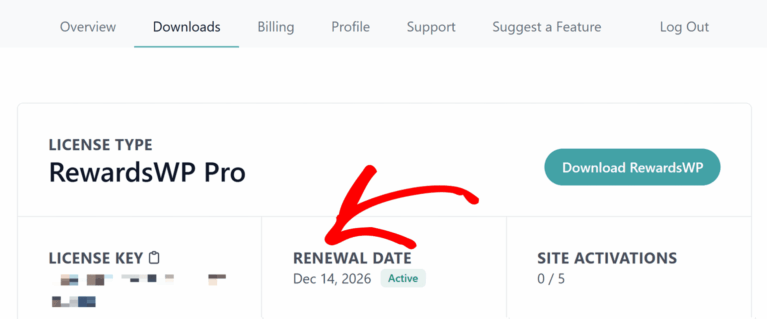
If you would like to check your license’s renewal date before proceeding, click on the Downloads tab.
Look for your license in the list, then check the Renewal Date section of the table.
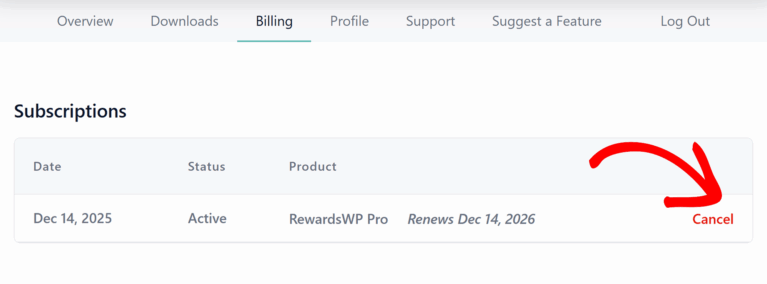
Next, click on the Billing tab. This page will display all of your previous license payments and all of your active subscriptions. To cancel auto-renewal on any license, scroll down to the Subscriptions section, then select Cancel.
Finally, you’ll see a confirmation page that confirms the subscription has been cancelled.
Frequently Asked Questions
These are some of the top questions we see about cancelling RewardsWP licenses.
Can I get a refund?
The RewardsWP no-risk money-back guarantee offers that, if at any time within the first 14 days of opening your paid Account, you decide that RewardsWP is not for you, then just let our awesome support team know (we make it easy!).
Can I continue using RewardsWP if I cancel my license?
If you cancel your RewardsWP license, you’ll still have access to your existing members, referrals and more. However, you will no longer receive plugin updates.
This prevents you from accessing new features and can lead to potential security risks.
That’s it! Now you know everything you need to cancel your RewardsWP license.
If we can answer any other questions about your subscription, please get in touch with our support team, and we’ll be happy to help!