





Advocate reward are what your existing customers earn when someone they refer makes a purchase. RewardsWP offers five reward types with flexible configuration options, so you can create the right incentive for your store. This guide covers each reward type, its settings, and how rewards are issued.
Where to configure advocate reward
To set up an advocate reward:
1. Navigate to RewardsWP » Settings » Referrals.
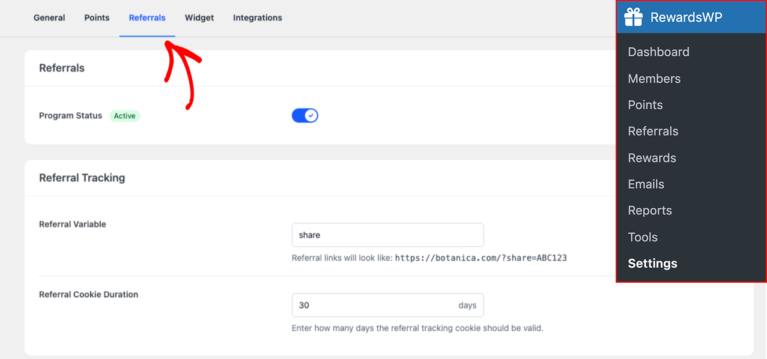
2. Scroll down to the Referral Rewards section.
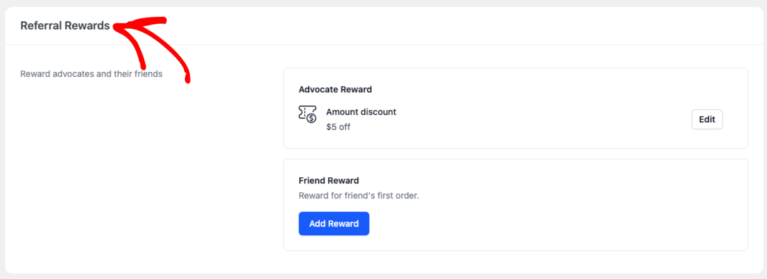
3. Find the Advocate Reward area (it’s configured separately from the friend reward).

4. Click Add Reward

6. Select a Reward Type from the list.

7. Fill in the remaining fields based on the reward type you selected (see the settings breakdown below).
8. Click Save Changes.

Reward types
RewardsWP offers five advocate reward types. The right choice depends on your store’s margins, your customers’ purchasing habits, and how you want to position the referral incentive. Here’s a breakdown of each option.
Amount discount
A fixed discount gives the advocate a specific dollar amount off their next order (for example, $10 off). When the referral completes, RewardsWP generates a unique WooCommerce coupon tied to the advocate’s account. The advocate can then apply that coupon at checkout just like any other discount code.
Fixed discounts work well when you want a predictable cost per referral. Every successful referral costs exactly the same dollar amount, which makes it straightforward to plan your referral program economics. They also communicate value clearly to advocates: “$10 off” is immediately understood, whereas percentages require mental math.

Percentage discount
A percentage discount gives the advocate a percentage off their next order (for example, 15% off). Like fixed discounts, RewardsWP generates a unique coupon code, but the actual dollar savings scale with the order size. An advocate spending $50 saves $7.50 with a 15% coupon, while one spending $200 saves $30.
This reward type is a strong fit for stores with a wide range of order values, since it naturally scales the incentive without you needing to create multiple reward tiers. The tradeoff is less predictable cost per referral on your end.

Free shipping
Free shipping removes shipping charges from the advocate’s next order. For stores where shipping costs are a significant portion of the total, this can be one of the most compelling incentives you can offer. Shipping fees are consistently cited as a top reason customers abandon carts, so removing that friction directly addresses a known pain point.
The coupon RewardsWP generates sets the WooCommerce free shipping flag, so it works within your existing shipping zones and rules.

Free product
Free product reward let the advocate choose from a selection of specific products you’ve designated as eligible. This works particularly well for stores that want to introduce customers to new products, offer branded merchandise, or provide sample-sized versions of popular items. The tangible nature of receiving a physical product often creates a stronger emotional connection than a dollar discount.
There’s an important safeguard built in: if all selected free products go out of stock, RewardsWP automatically disables the referral program to prevent advocates from earning a reward that can’t be fulfilled. The program re-enables when stock is replenished or you change the reward type.

Points
The points reward adds a set number of points to the advocate’s loyalty balance when their referral completes. Instead of issuing a coupon, the advocate accumulates points that they can later redeem for any reward you’ve configured in your points program.
This is the best option when you’re running both the referral and points programs together, since it ties referrals directly into your loyalty ecosystem. An advocate who earns 500 points from a referral might combine those with 300 points from purchases to unlock a reward they couldn’t reach otherwise. It creates a compound engagement loop where each program reinforces the other.

Reward settings
Every advocate reward type shares a common set of configurable settings. These settings control what advocates see, what they receive, and the conditions under which they can use their reward.
Reward type
Select one of the five reward types from the rewards list: Amount discount, Percentage off, Free shipping, Free product, or Points. This determines the fundamental nature of the reward and which additional settings appear.
Reward amount
The value of the reward. What this number represents depends on the reward type you’ve selected:
| Reward type | Amount means |
| Points | Number of points awarded |
| Fixed discount | Dollar amount off (e.g., 10 = $10 off) |
| Percentage discount | Percentage off (e.g., 15 = 15% off) |
| Free shipping | Not applicable |
| Free product | Not applicable |
When choosing your reward amount, consider the value relative to your average order. A $5 coupon on a $100 average order feels small, but the same $5 on a $15 average order feels generous. The reward needs to be meaningful enough to motivate sharing without cutting too deeply into your margins.
Minimum spend
The minimum cart value required to use the reward coupon. The default is 0 (no minimum), which means the advocate can apply it to any order regardless of size.
Setting a minimum spend serves two purposes: it protects your margins on small orders, and it naturally encourages advocates to add more to their cart. For example, a $10-off coupon with a $50 minimum means the advocate saves 20% on a $50 order but needs to reach that threshold first. Choose a minimum that feels achievable based on your store’s typical order values.

Reward expiry
This determines how long the advocate has to use their reward before it becomes invalid. The options are:
- Never expires
- 30 days
- 3 months (default)
- 6 months
- 1 year
- 2 years
Shorter windows (30 days, 3 months) create urgency and drive faster repeat purchases. Longer windows (1-2 years) are more generous but reduce that urgency. The “Never expires” option removes time pressure entirely, which is a good fit if your customers tend to make infrequent, high-value purchases.

Free Product Selection
This setting appears only for the Free product reward type. It lets you select which specific products the advocate can choose from using a multi-select product search. Consider including products that introduce customers to new lines, have high perceived value but manageable cost to you, or that naturally lead to repeat purchases of consumable items.

How reward are issued
Advocate reward are issued automatically. Here’s the process:
- A friend clicks the advocate’s referral link and makes a purchase.
- The referral is created with a Pending status.
- Once the purchase is verified, the referral moves to Completed.
- RewardsWP’s referral lifecycle service automatically issues the advocate reward.
Each completed referral generates exactly one reward. RewardsWP deduplicates by the friend’s email address and user ID, so the same friend can’t generate multiple rewards for the same advocate.
You don’t need to manually approve or distribute rewards. The entire process is automatic from the moment the referral is completed.
Frequently asked questions
Advocate reward go to the existing customer who shared the referral link. Friend reward go to the new customer who clicked the link and made a purchase. You configure each separately, and they can be different reward types.
No. The Points reward type is only available for advocates. Friends can receive fixed discounts, percentage discounts, free shipping, or free products, but not points. This is because friends may not be members of your rewards program yet.
You should configure both to provide a complete referral experience. The advocate reward motivates your existing customers to share, while the friend reward gives their referrals a reason to make that first purchase.
That’s it! Choosing the right advocate reward is key to building a referral program that motivates your customers to share.